
Worried About Your Video Prompt? Ask AI to Explain the Shot First
Use a prompt skill and a local AI assistant to organize reference roles, camera choices, and cause and effect. Add previz where words remain unclear, then check the inputs before generating.
The references are ready, but the prompt keeps getting longer and you still do not know what the model will shoot. Ask an AI assistant working locally to inspect the images and text, using a prompt skill suited to the video model.
Do not stop at “optimize this.” We need the assistant to explain the picture it understands, find conflicts, and then rewrite. Otherwise, a more fluent prompt may simply describe the wrong scene more thoroughly.
Give the assistant the intention and the references together
Start with the event this shot must accomplish, then attach the images and videos you have decided to use. Group them by purpose: character identity, expression, pose, setting, and previz. You do not need to include every candidate.
For a three-person conversation, character sheets establish who is who, expression references guide particular moments, and a scene image establishes the location. If you also have previz, say whether it controls the camera, blocking, or the entire action. Do not leave the assistant to infer its role.
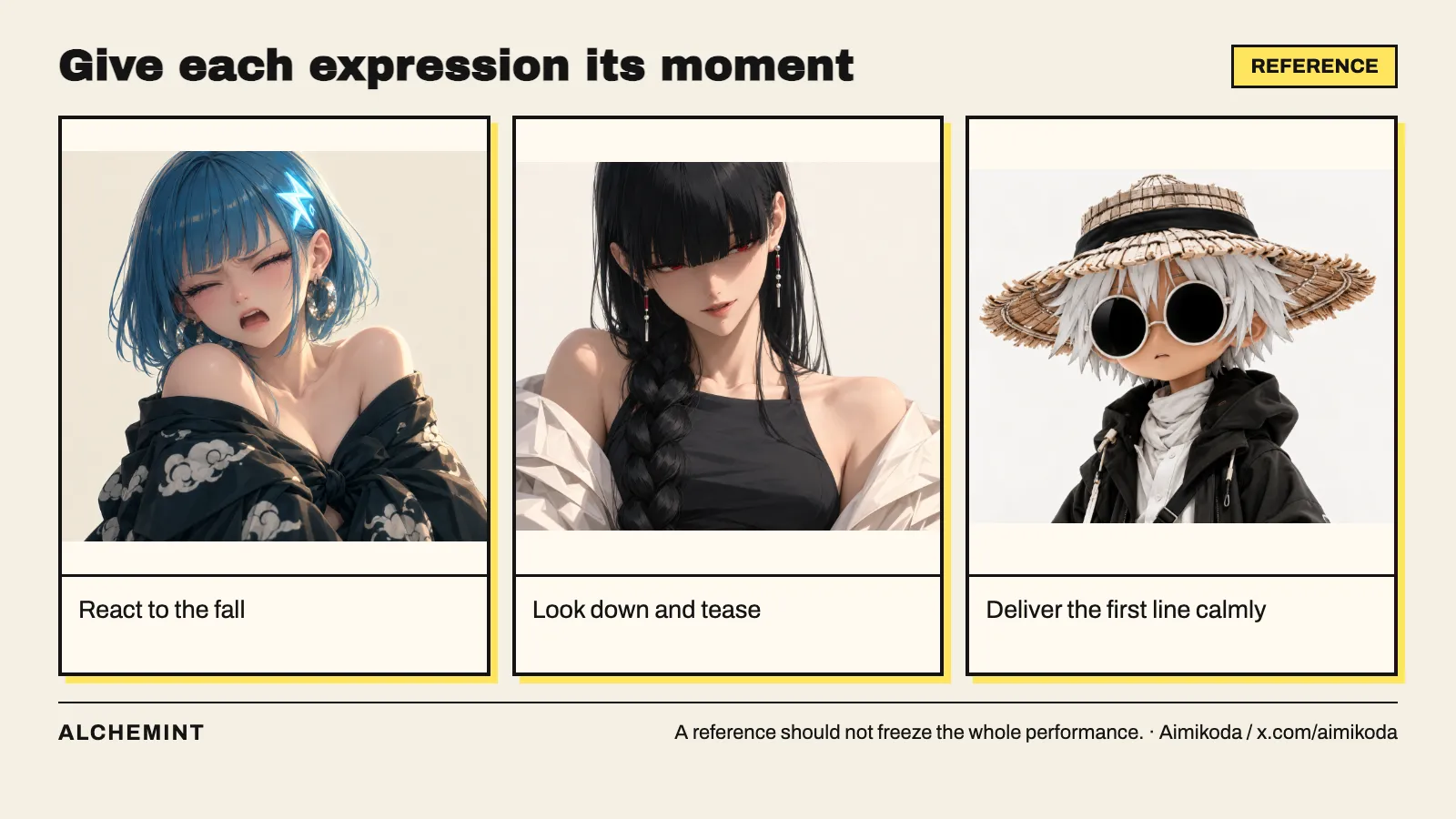
While preparing those images, note when each applies. WHITE’s calm expression belongs to an earlier line; after being teased, he becomes annoyed. A calm reference should not suppress that later turn.
Ask for a plain-language description before generation
A skill is a set of working instructions for an AI assistant. In Heist, we used a Seedance prompt skill to help organize character assignments, reference roles, and action order. It structures the information; we still need to decide whether the result describes the scene we want.
Try this collaboration instruction:
Use a prompt skill suited to this video model. Read the following
story and inspect the reference materials.
Do not submit a generation yet. First answer:
1. Who is where at the start, and where is the camera looking from?
2. What happens in order, and what does each action change?
3. Which image defines identity, and which supplies only an
   expression, pose, or setting?
4. Do the words and images conflict? What do we still need to decide?
Describe the expected picture in plain language. Once we confirm
that understanding, write one complete prompt.
If the assistant describes “she accidentally falls” when we want “she deliberately leaps in,” fix that understanding first. If it confuses a character turning with a camera orbiting, separate the two motions. These change the picture; swapping in professional terminology will not settle them.
In one running setup, our image reference showed a natural arm swing while the text still described arms held behind the body. The useful lesson is the final cross-check: the picture, story description, and video prompt should ask for the same movement.
Expand an action into its setup, contact, and consequence
“Break the desk and fall” could still produce a character who lands securely and then jumps off. If the joke depends on the desk unexpectedly failing, explain how the support disappears.
Before: the character is descending and the desk is intact.
Contact: the sole presses onto the end of the desk; the top bends down.
Change: the contact area cracks and the support collapses under her weight.
Reaction: she intended to bend her knees and stand, but loses support,
throws out her arms for balance, and lands sitting on the floor.
After: she remains beside the broken desk while another character
looks down and delivers the next line.
Adapt this prompt fragment to another action by asking the same questions: what has not happened yet, what does contact change, and how does the character respond?
Then choose the framing for the essential events. Show a desk-corner detail for foot contact and a face-and-shoulders close-up for the cry of pain. Do not ask one instant to reveal the entire room while also making every finger and mouth movement readable.
When words remain unclear, make a short previz
If we and the assistant keep circling around whether the camera follows the descent or stays in place, return to Blender and preview that section. It gives both sides a visible picture. We can use it to correct the wording and, if useful, submit it as a video reference.
Previz does not replace every other input. A simple figure can explain a route without demonstrating a grip or facial expression. State the role of each reference:
The character sheet defines appearance, proportions, and clothing.
The pose image defines the hand positions and contact with the prop.
Use the previz only for camera path, relative character positions,
and cut timing.
Do not carry the rough model’s shape or proxy colors into the
finished character design.
If you are planning greenscreen compositing, specify what outside the character belongs to post-production. Contact points, landing positions, and camera angles must agree with the prepared background.
Confirm four practical things before submitting
First, the references are actually attached and each has a purpose. Second, text, images, and previz do not ask for contradictory poses or positions. Third, the essential before-and-after states and camera choices can be explained clearly. Fourth, you know how you intend to use the result: cut it directly into the film, key and composite it, or take only part of the performance.
Those checks do not guarantee a successful first generation. They mean you are trying a considered way of filming the scene. If the camera position is undecided, make previz. If a key expression is missing, make an image. If the wording is confused, have the assistant reorganize it. Different problems do not all need the same extra material.
A generated landing and conversation in the reading room. Watch for contact, loss of support, reaction, and the following line, rather than judging only whether the frames look attractive.
If the result does not work, return to the first thing that went wrong
| What do you see? | What should you revise first? |
|---|---|
| The identity is right but the emotion is wrong | Expression references, the emotional turn, and when each applies |
| The pose works but the camera moves the wrong way | Camera description; add previz if it remains ambiguous |
| The performance works but the location changes | Consider a fixed background and greenscreen character generation |
| The greenscreen figure does not fit the scene | Camera angle, contact point, silhouette, and occlusion planning |
| The actions are present but the cause and effect is wrong | Starting state, trigger timing, and consequence |
Adjust the issue that actually changes how the scene reads. For more on organizing references with a skill, see what the Seedance prompt skill handles.
Start here: how much should you prepare before generating?
Original character designs purchased from Aimikoda.