
What Quantized MiniMax H3 Gives Up: QuantFunc, Kijai and NVFP4 Measured on 246 Clips
The 8-step QuantFunc build keeps every camera move the 20-step builds keep. It pays elsewhere: more of your previz stays on screen, and fewer written cuts land.
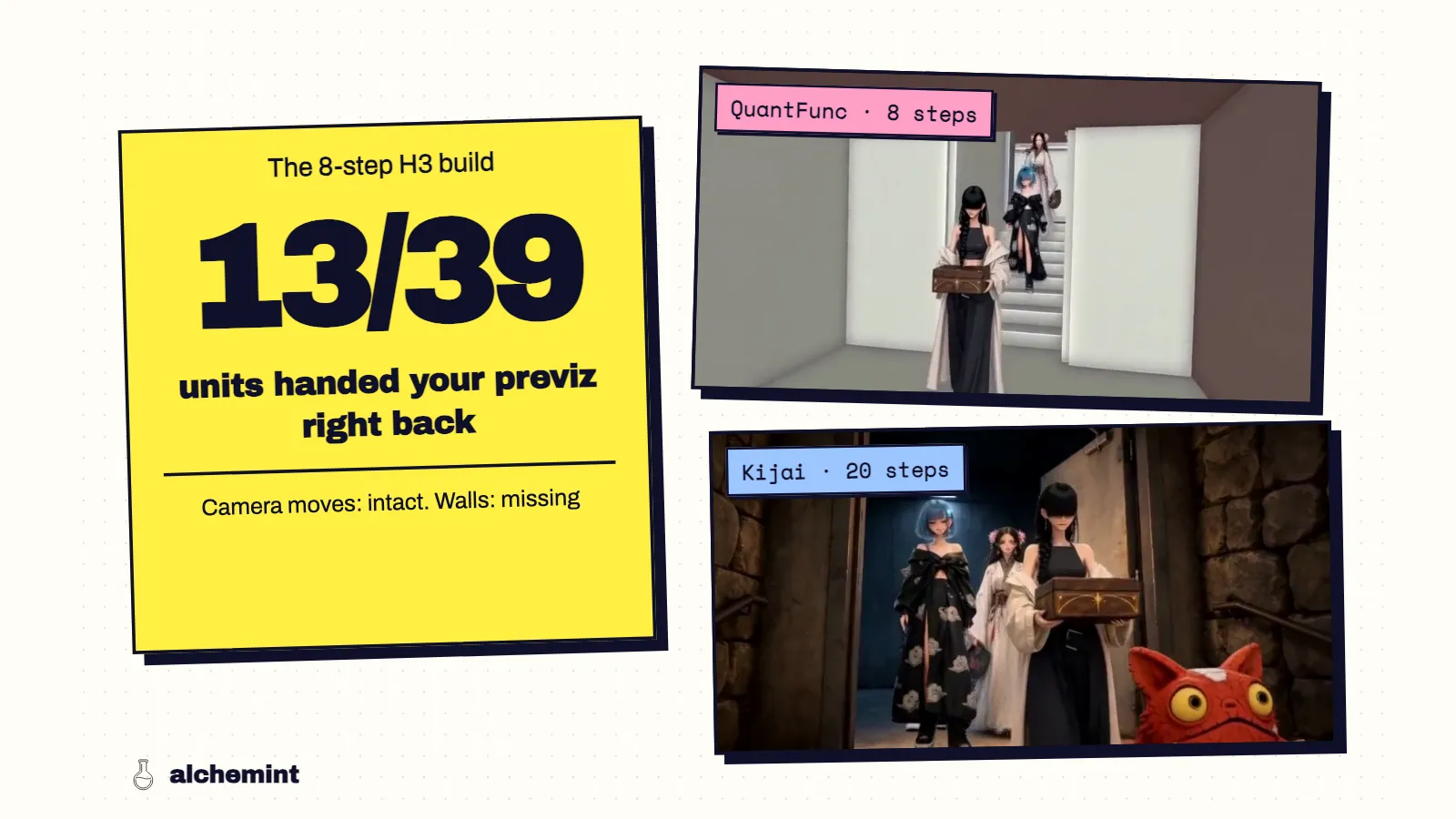
Our 8-step QuantFunc build of MiniMax H3 renders a candidate about 2.2 times faster than the 20-step builds on the same RTX 5090. On 13 of 39 previz units, it also handed my Blender gray walls straight back to me, with finished characters standing in front of them. The two 20-step builds did that on 6 and 9 units.
That's the trade I wanted to understand. If you run H3 locally, you're picking a quantization and a step count, and the model cards only tell you about VRAM and speed. So I took 246 clips from one production batch and measured what each build actually changed on screen.
Short answer: none of the three builds lost camera moves. The 8-step build pays in two places, leftover previz and cut timing. Kijai's W4A8 build pays in a third: on two inputs it produced nothing but color noise.
The three builds
| QuantFunc | Kijai | lilcheaty | |
|---|---|---|---|
| Weights | W4A4 SVDQuant, rank 128 | W4A8 mixed (4-bit weights, 8-bit activations) | NVFP4 on the main linear layers |
| Steps | 8, with the LightX2V Turbo LoRA fused in | 20 | 20 |
| Native seconds per output second | 38.84 | 86.55 | 81.02 |
All three share the same text encoder (Qwen3-VL NVFP4-AWQ), the same FP16 video VAE and the same reference-to-video node. The speed numbers come from 58 matched clips; the speed comparison has the timing details. Because QuantFunc changes both the quantization and the step count, I can't split its results between the two. When I say "the 8-step build" below, I mean that whole package.
Quantization didn't cost camera moves
I scored every camera and editing technique in the previz against each output: 73 technique instances per build per prompt version, 438 judgments in total. The share kept or partly kept:
| Prompt version | QuantFunc | Kijai | lilcheaty |
|---|---|---|---|
| V1 | 93% | 93% | 94% |
| V2 | 94% | 94% | 96% |
The failures don't sort by build either. Crane moves, horizontal pans, split screens, dissolves, crash zooms and cutaways landed in all six conditions. Dolly zoom, a three-second freeze and an empty static setting failed in all six. If your dolly zoom doesn't work, a different quant won't fix it; that's a limit of H3 itself, and I cover it in the prompt article.
Where the 8-step build pays: it traces the previz
I measured how closely each output's edges follow the Blender previz at the same timestamp. On the same unit with the same prompt, QuantFunc tracked the previz more closely than Kijai in 72% of units (V1) and 69% (V2), and more closely than lilcheaty in 69% and 64%.
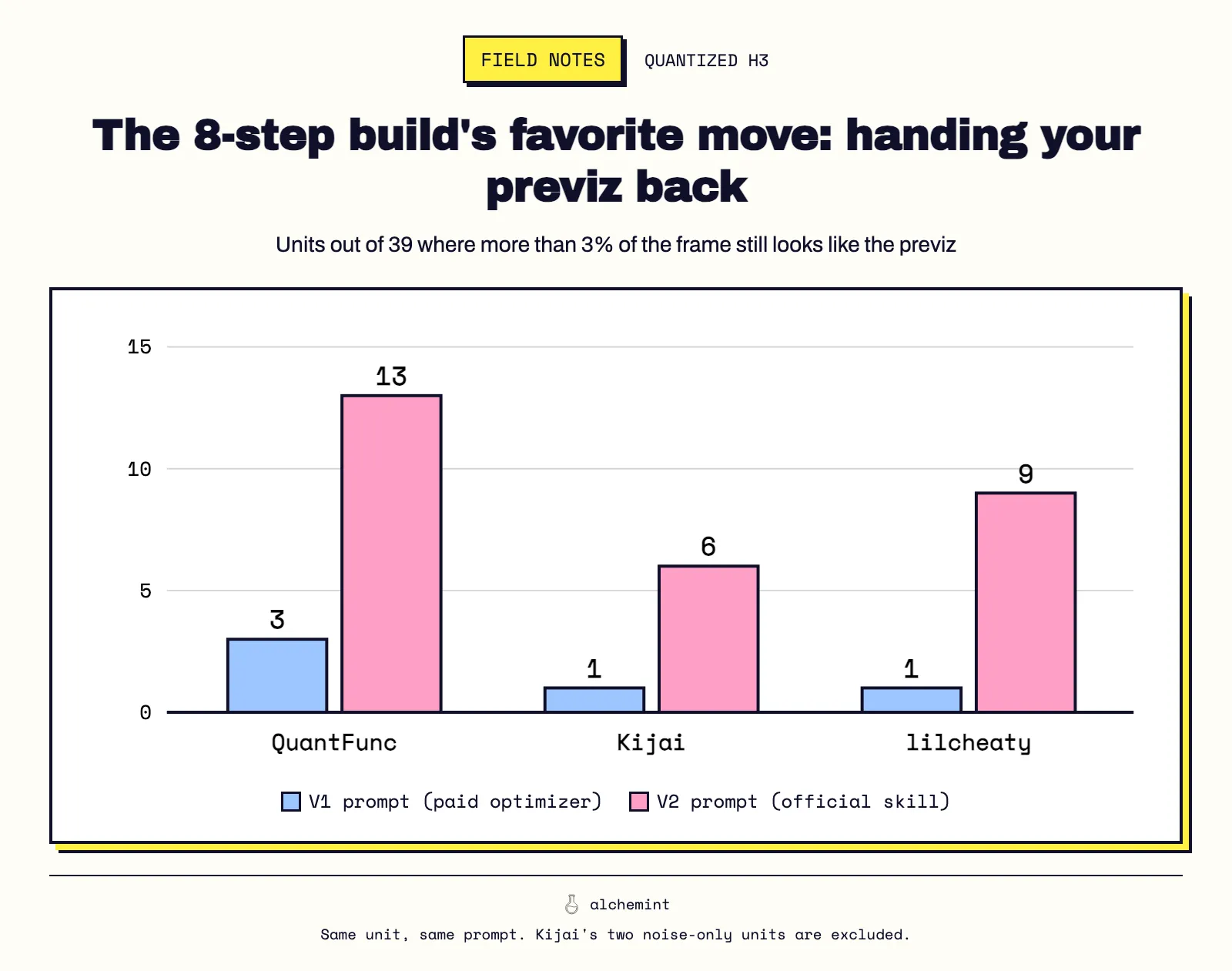
Tracking the layout sounds like a virtue until you look at what else comes with it. I counted a clip as leaking previz when more than 3% of its sampled frame area stayed untextured, near-colorless gray, the look of an unrendered Blender wall. Out of 39 units where all three builds produced a picture:
| Prompt version | QuantFunc | Kijai | lilcheaty |
|---|---|---|---|
| V1 | 3 | 1 | 1 |
| V2 | 13 | 6 | 9 |
| V2, more than 10% previz | 8 | 1 | 4 |
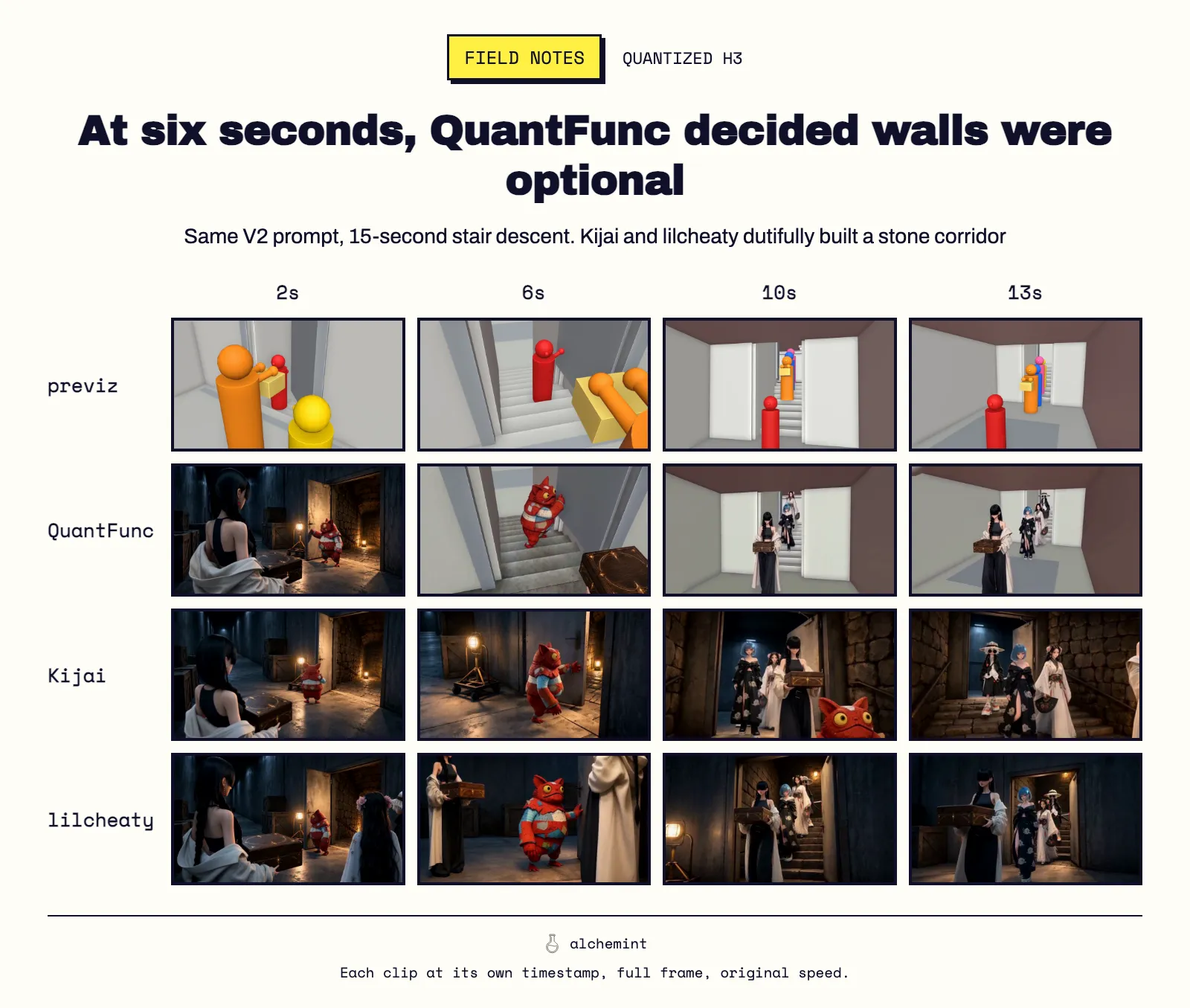
The worst case was a 15-second stair descent. From six seconds on, QuantFunc's V2 output simply became the Blender scene: flat gray walls, gray stairs, rendered characters walking through it. Kijai and lilcheaty rendered a stone corridor with lamps from the same prompt and the same previz.
My reading, which I haven't tested directly: H3 conditions on every retained frame of the reference video through the VAE, so the previz's look is in the conditioning from the first step. A 20-step sampler has more chances to paint over it. An 8-step distilled sampler stays closer to what it was given. That would also explain why QuantFunc's edges follow the previz more closely.
The prompt version matters more than the build here. V2 roughly tripled the leak count in every build. Why that happens is the subject of the H3 prompt template.
It also listens less to written cuts
H3 takes its cut points mainly from the text, not from the reference video (the evidence is in the cut-timing article). Given a prompt with every cut written as a timestamp, the share of previz cuts each build actually cut on, within half a second:
| Prompt version | QuantFunc | Kijai | lilcheaty |
|---|---|---|---|
| V1 | 54% | 56% | 56% |
| V2 | 58% | 69% | 75% |
The V1 rows are low for everyone because the paid optimizer dropped or moved some cuts from the text. With V2, where the cuts were all written, lilcheaty followed 36 of 48 and QuantFunc 28. If your previz is a cut-heavy sequence, the 8-step build is the one most likely to hold a shot too long or cut somewhere else.
Kijai's failure mode is total
Kijai left the least previz on screen and had the most motion: its outputs moved more than lilcheaty's in 64–67% of paired units. It also failed completely on two units. Both prompt versions, run separately with different seeds, came back as full-frame color noise for the whole clip. QuantFunc and lilcheaty rendered those same two units normally.
Same input, two prompts, two seeds, same result: I'd treat that as an input that this build can't handle. Rewriting the prompt is wasted effort. Send that unit to another build.
What I'd run, and when
- QuantFunc for blocking passes: does the staging read, is the handoff clear, does the timing feel right. At 2.2 times the throughput, I get more of those answers per hour. I don't trust it for the final pass on shots with large untextured surfaces in the previz.
- lilcheaty when the cut timing matters. It followed written cuts most often and leaked less than QuantFunc.
- Kijai for the final pass on environment-heavy shots. It has the cleanest surfaces. If a unit comes back as noise, move that unit to lilcheaty.
What would change my mind: a previz that is already roughly colored and textured. My hypothesis is that QuantFunc's tracing tendency would then cost much less. I haven't run that test yet.
One dead end, for the record. My first pass flagged lilcheaty as the softest build, because a sharpness metric scored it lowest in 72–80% of pairs. When I put same-timestamp frames side by side, the gap came from camera timing: one build was further along the same crane move. Detail looked the same. I dropped the claim.
How I measured
The full setup is in the series opener. Specific to this article:
- Previz leakage uses 16-pixel blocks with saturation under 0.10, mid brightness and almost no texture, with thresholds calibrated on previz frames against finished frames. Cuts were detected from frame-difference spikes and matched to previz cuts within ±0.5 s.
- The two Kijai noise units are excluded from every three-way comparison, which leaves 39 units.
- These are results for these builds on one stylized batch, on one GPU model. They aren't a benchmark of the quantization methods in general.
- 01MiniMax H3 vs Seedance 2.5: We Fed One Previz to Both, 274 Times
- 02Seedance 2.5 Cuts on Your Previz. MiniMax H3 Cuts on Your Text.
- 03Why MiniMax H3 Leaves Your Previz on Screen and Seedance 2.5 Mostly Doesn't
- 04What Quantized MiniMax H3 Gives Up: QuantFunc, Kijai and NVFP4 Measured on 246 ClipsYou are here