
8 Steps or 20? Which H3 Open Workflow Gets Candidate Footage Faster?
QuantFunc's roughly 2.1–2.2x candidate-speed advantage makes it my first trial configuration. I'd spend the longer twenty-step run on a known gap in the shot.
For this MiniMax H3 batch, I'd use QuantFunc's eight-step configuration to test a scene, then spend the longer twenty-step runs on shots with a known gap. Its roughly 2.1–2.2× advantage in candidate generation is most useful for finding problems sooner. A longer run has to buy something the shot needs, such as a finished stone corridor.
The reason goes beyond the timing table. In the seven-second handoff made with the second prompt set, QuantFunc clearly shows Serelya passing the crystal to Suseka, then withdrawing her hand to cast a spell. That candidate can answer whether the scene works. I wouldn't make the possibility of better twenty-step output the entry fee for every trial.
What does the twofold advantage buy for iteration?
The main comparison contains 58 matched groups, with 511 output seconds per workflow. Total native execution seconds divided by actual output seconds gives 38.84 for QuantFunc, 86.55 for Kijai and 81.02 for lilcheaty. For the same output duration, the latter two took about 2.23 and 2.09 times as much native generation time. That gives QuantFunc roughly a 2.1–2.2× candidate-speed advantage.
| Workflow | Configuration in this batch | Native generation seconds per output second |
|---|---|---|
| QuantFunc | INT4 r128, 8-step Turbo LoRA | 38.84 |
| Kijai | W4A8 mixed, 20 steps | 86.55 |
| lilcheaty | NVFP4, 20 steps | 81.02 |
These complete configurations ran across two machines with the same RTX 5090 GPU model. The 58 groups use Kijai and lilcheaty's later CUDA 13.0 inference configuration; QuantFunc retained its baseline. Native timing includes model loading, encoding, sampling, VAE decoding, audio and saving. It excludes queues, waiting, dispatch, external input preparation and archiving. Steps, LoRA, weights, seeds, loading and execution paths differ together. The figures don't isolate a step or precision effect, and aren't GPU kernel benchmarks.
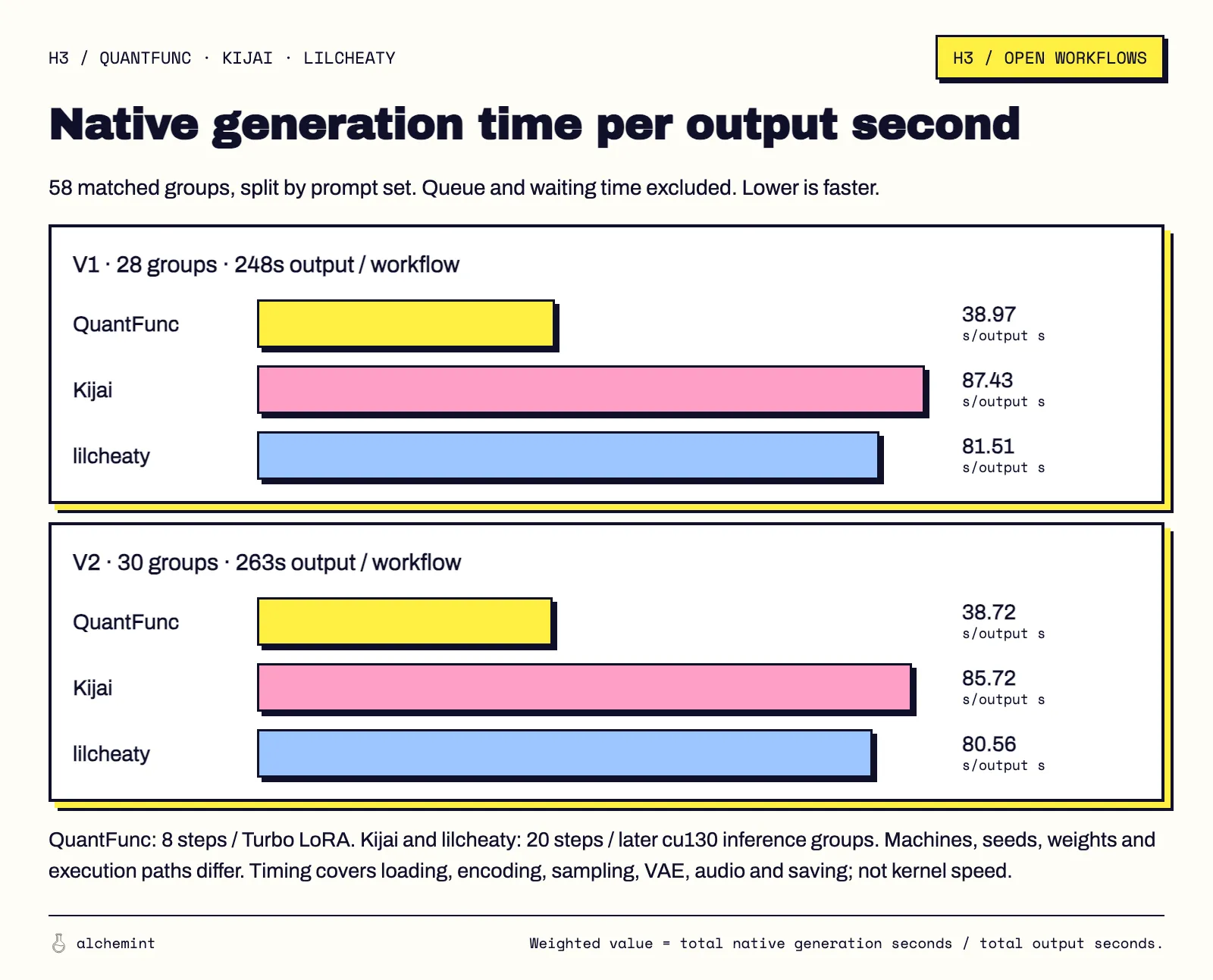
The chart separates the prompt sets; the speed order holds in both. A faster candidate lets me decide sooner whether to change blocking, a handoff or framing. It doesn't establish the same advantage in delivering final footage. We haven't assigned every output a pass or fail under one quality standard. Use the ratio to budget candidates.
A real handoff can already answer the trial
All three second-prompt outputs show the sequence: the two share the crystal's weight, Suseka takes possession, and Serelya withdraws her hand to cast. QuantFunc's native execution took 236.64 seconds, Kijai 515.56 and lilcheaty 481.31: about 3.94, 8.59 and 8.02 minutes.
Second-prompt crystal handoff, seven-second outputs at original speed. Native execution: QuantFunc 236.64 seconds, Kijai 515.56 seconds and lilcheaty 481.31 seconds. This silent comparison assesses visuals; source audio is not evaluated.
If this run is meant to test whether the blocking and transfer are readable, QuantFunc has answered it. The hand-object boundary can still be selected more carefully, and event timing differs. Those are concrete requirements available after seeing a candidate. I'd get that result before deciding to redraw the scene, rerun it or change configuration, rather than lengthen every run before knowing the problem.
A known gap gives the longer run a job
The second-prompt stair descent changes the recommendation. QuantFunc finishes the clothing but keeps the previz scenery; Kijai and lilcheaty supply stone walls and lighting. A shot that must go straight into the same film can justify more generation time for the finished environment. The quantization article shows that comparison in full. A good portrait can't approve the missing corridor.
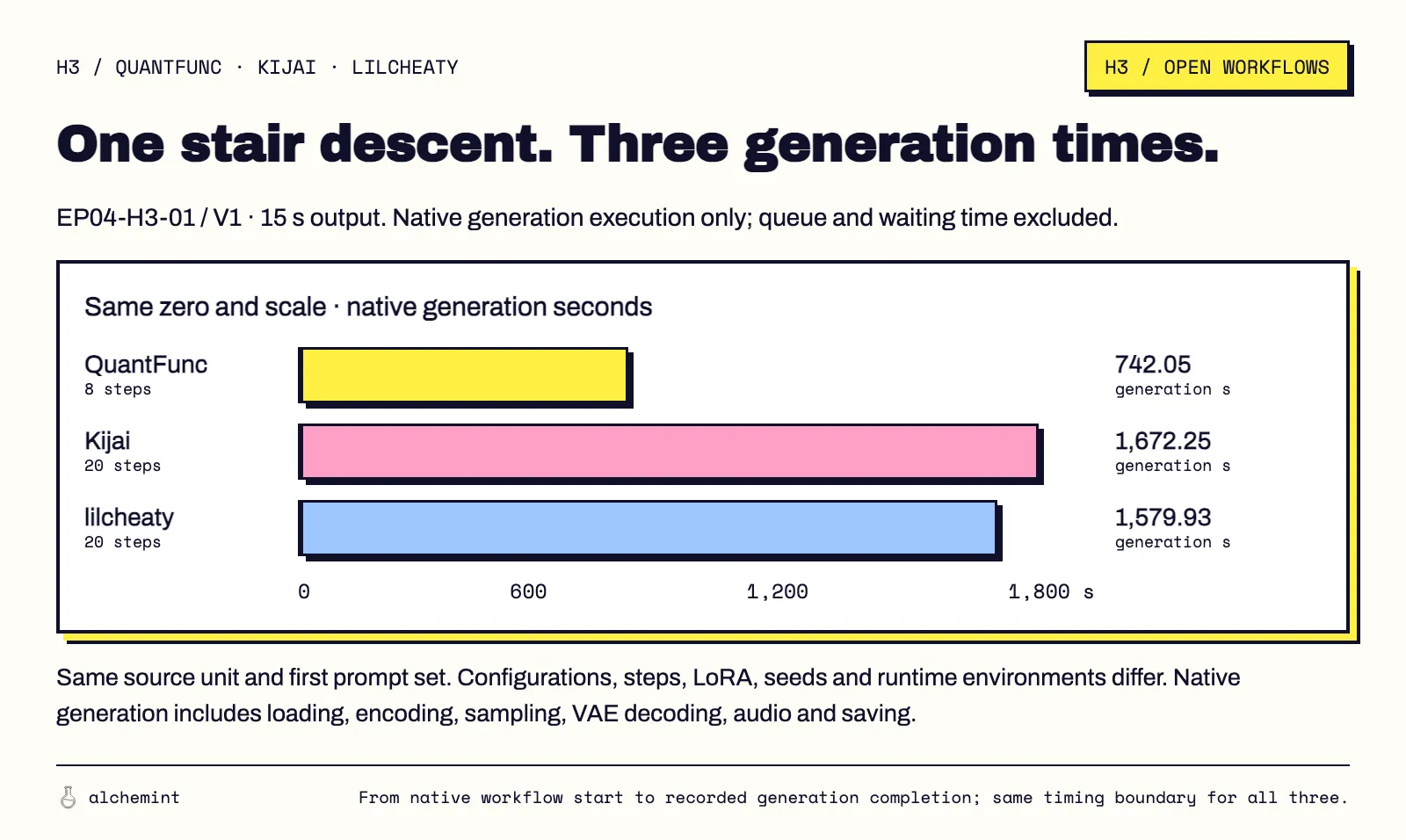
The first-prompt version of that fifteen-second descent shows the time cost: QuantFunc 742.05 seconds, Kijai 1,672.25 and lilcheaty 1,579.93, about 12.4, 27.9 and 26.3 minutes. The chart below times the first version; the art observation above concerns the second.
I'd pay the extra time for an output that finishes the corridor. Twenty steps alone wouldn't earn it. Two Kijai second-prompt outputs are noise throughout the evenly spaced samples, and the guide-light scene keeps previz geometry across the workflows. A slow configuration still needs selection.
For the next run, name the question the candidate must answer. Use QuantFunc first when testing whether the scene works. Once a visible gap prevents the shot from entering the film, rerun that shot with a configuration that can supply the missing part. When an output already completes the shot, spend time on its connection to the next one rather than rerunning for a larger step count.
Data scope and reference coverage
The batch contains 41 source units, two prompt sets and three configurations: 246 videos. Main timing uses completed records through October 1, 2026, at 14:10 Taipei time. Earlier environments in the remaining groups aren't included in the main means. Each group shared the actual prompt, references and prepared Blender video; outputs are 864 × 480 at 24 fps. The handoff comparison preserves all seven seconds at original speed, complete frames and each source start. It assesses visuals without evaluating audio.
Uploaded previz was 854 × 480, prepared at 864 × 480 and 24 fps. All 82 groups matched prepared hashes and effective reference frames. The native reference node truncates the reference tail to a valid 17k+5 frame count. A seven-second reference retains 158 frames, about 6.5833 seconds; the last zero-based frame, 157, is at 6.5417 seconds. This is temporal tail truncation, not spatial cropping or new generation; output duration is separate. Check retained coverage before assessing adherence at the end.
Qwen samples every 12 retained frames (2 fps), while the VAE uses all retained frames. H3 cannot be described as seeing only 2 fps, and the truncation record alone doesn't explain an individual failure. Seedance's internal reference sampling and encoding remain unverified; identical handling cannot be assumed.
The full setup is in the series opener.