
What Should a Video Prompt Do Once You Have Previz?
Use Seedance 2.5's official sd25-pe skill to organize previz, character sheets and scene references. An example shows how to specify identity, appearance, performance and sound.
Once you have previz, the video prompt should specify character identity, appearance, performance and sound; the reference video should carry the spatial and camera decisions you've already made.
In our heist animation, the Blender rehearsal supplies the action and camera, character sheets supply appearances, and scene artwork supplies specified materials and light. The text connects those inputs by telling the model how to use each one. Write the information the video doesn't convey, or that a model could misread.
The official Seedance 2.5 skill, sd25-pe, addresses this directly. When a video already supplies the action, camera movement and sequence accurately, specify which dimensions to inherit; rewriting every action can introduce conflicts. That gives us a useful basis for deciding what belongs in a previz prompt. Official skill 0.1.1: Assign Asset Roles and Subject Mappings.
Give the scene to the official sd25-pe skill
BytePlus's prompt guide provides this installation command. Run it in the project you want your AI agent to work with:
npx --yes skills@latest add \
  "https://arkdocs-en.tos-ap-southeast-1.volces.com/skills/" \
  --skill sd25-pe --yes
The guide's invocation is /sd25-pe followed by your prompt. The skill organizes the text and reference roles into one prompt; the video tool handles generation separately.
For the night-market scene, attach the previz and the character, prop and scene images named in the example below. Then give the agent this request alongside your shooting instructions:
/sd25-pe
Organize the following brief into a Seedance 2.5 video-generation prompt.
@EP5-U2-clean.mp4 is a rough previz for blocking, box transfers and camera.
Use my character and prop mappings; preserve the box's handoff order.
Keep the character relationships and withhold the box lettering until its reveal.
The six labels below separate the decisions you give the skill. It reorganizes them using the appropriate task template; it needn't retain our section names.
A cyan cylinder is not a costume instruction
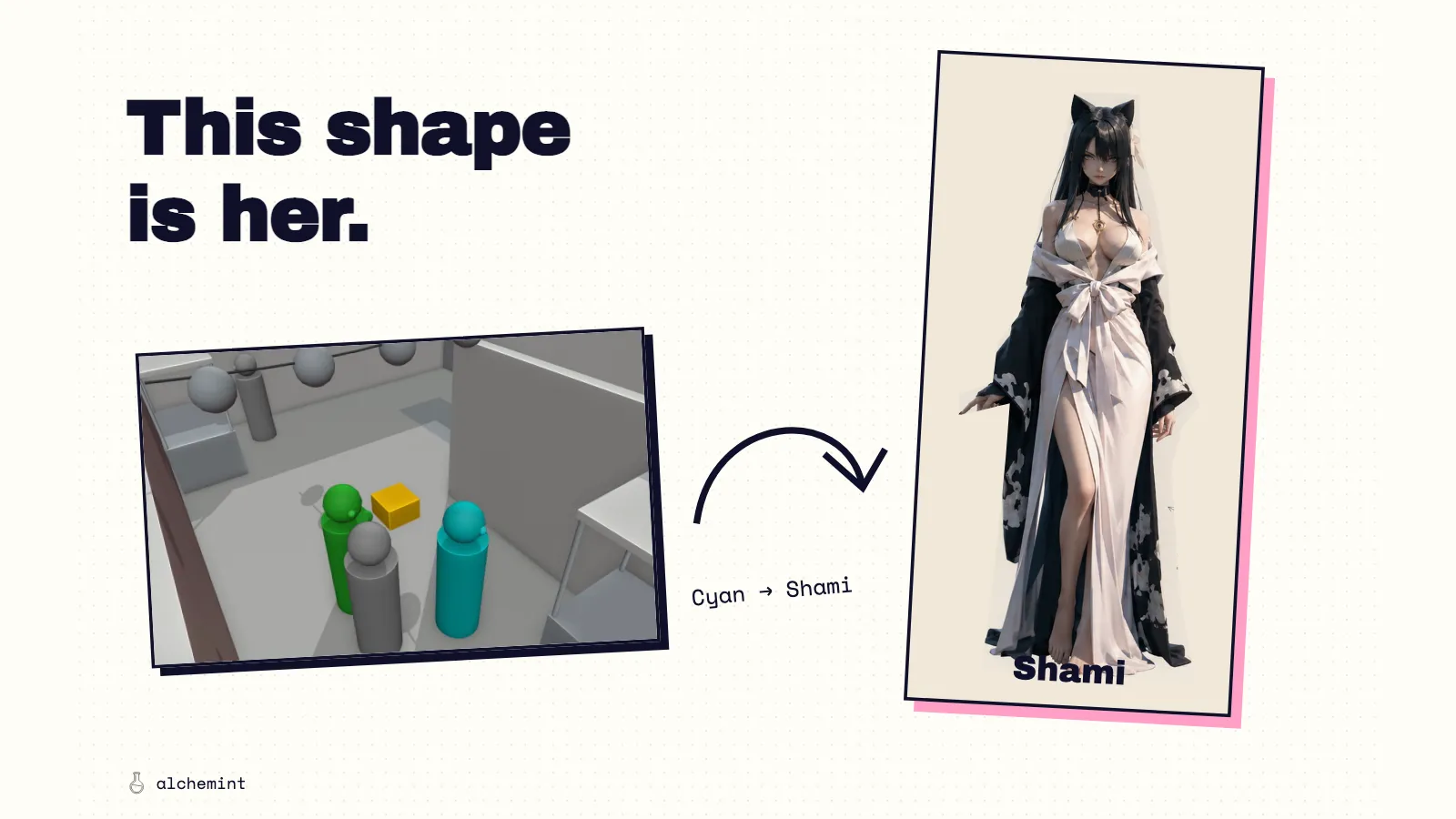
In our night-market reference, the cyan figure represented Shami and the green figure represented Kai Miren. Grey figures were pedestrians. A small gold block represented the sealed box.
This fits what the skill calls a coarse blockout, a rough previz: simple geometry supplies movement and space, with each shape mapped to a final person or prop. A fine previz (the skill's "fine blockout") already has the relevant subject, prop or scene structure to preserve while changing its appearance. In our coarse version, the rehearsal supplies the staging; character sheets supply the clothes. Official skill: Blockout References and Rendering.
That distinction also helps describe the task. Using a previz to generate new imagery from its movement and space is video generation. Attaching a video doesn't automatically make the task video editing. This is the role our Blender rehearsal plays when we pass it to Seedance.
Character sheets brought their own ambiguity. Kai's reference included a notebook and pen. In this scene he needed his hands for the box, so the production prompt explicitly excluded those objects. Several poses on a sheet represented one person. The white background and written labels belonged to the sheet layout.
The skill also preserves the user's explicit mappings and lists unassigned attachments individually under 【Unused Assets】. If we also attached the lettered box used for the ending, we would exclude that image from this scene rather than leave it competing with the unmarked box.
The scene images needed equally specific roles. We wanted the night-market image's stone walls, wet paving, warm lanterns and stall materials. The prompt asks the model to take the alley, corner and main-street layout from the previz, with the aim of preserving the rehearsed route while changing its appearance.
That division led us to remove “Subjects and Geography” from 15 prompts; the other five already did without it. An older description and the revised scene had given different routes to the same meeting. Character relationships and box ownership still needed explicit instructions, but maintaining two complete accounts of the space was unnecessary.
A reference prompt you can adapt
Below is an edited, English-language condensation of our EP5 night-market production prompt. The six labels expose its decisions so they can be reused. It is a teaching example drawn from the production text, not a verbatim record of a particular API submission.
The filenames name the actual assets used in that production text. Attach equivalent files and change the mappings before using it for another scene. An @ name is only useful when it identifies a reference actually supplied to the video tool.
IDENTITY
In @EP5-U2-clean.mp4, the cyan figure is Shami, the green
figure is Kai Miren, and grey figures are pedestrians.
The gold block is the single sealed box. Use @Shami.png
and @KaiMiren.png for the two characters. All poses on
each character sheet describe the same person.

KEEP
Follow the previz for the alley-to-street route, walking
pace, body proportions, box trajectory, camera positions,
camera movement and cuts. Preserve the box's ownership:
Shami → Kai → Shami → Kai. Show each release, flight and
catch before changing its holder.

REPLACE
Replace the rough figures and their colours with the
character-sheet appearances. Replace the gold block with
@sealed-box-unmarked.png. Use @night-market-street.png
for stone walls, wet paving, lanterns, stalls and night
lighting. Use the previz for their spatial arrangement.
Use @station-annex.png for the distant station buildings.

EXCLUDE
Leave out Kai's notebook and pen, reference-sheet labels,
white backgrounds and people pictured in the scene art.
Do not turn the previz's body colours into costume colours.
The box has no lettering in this scene.

PERFORMANCE
Keep the exchange relaxed. In Kai's close-up, he glances
slightly toward Shami and back ahead while walking.
During the 10–13-second pass, Kai raises the box before
release. Shami watches it approach, reaches to the catch
position, and receives it without stopping.

AUDIO
Use indistinct market chatter and vendor calls, with a
light contact sound when the box is caught. As they reach
the square, let the market recede into station ambience.
No dialogue, narration or subtitles.
These six headings are our teaching breakdown, not an official syntax. Adapt the text to your scene or give it to sd25-pe to organize. If a sentence under KEEP contradicts the reference video, fix that conflict. The full production prompt also contains the event timing; this excerpt concentrates on how the references divide the work.
Set output aspect ratio, total duration and resolution in the generation tool or API. The example's 10–13-second passage is an existing story instruction to preserve; the skill treats output parameters and event timing separately.
Keep the information the rough model cannot carry
A cylinder can turn toward another cylinder. It cannot show the small, relaxed glance we wanted from Kai as he walked. The prompt supplied that performance, including the instruction to avoid a sudden large head turn. It also supplied the sound of a catch, the indistinct crowd and the change in ambience at the station square.
Sound has timing. In a different unit, Shami touches a button, then the button sounds and the stair lights respond. If the sound or the light arrives first, the cause of the event changes. The text kept that order explicit alongside the animation.
The box carried another piece of information: the ending. We prepared an unmarked box for the escape and a separate version bearing token reset for the final reveal. The night-market prompt selects the unmarked reference. Giving it the lettered version could disclose something the scene is supposed to withhold.
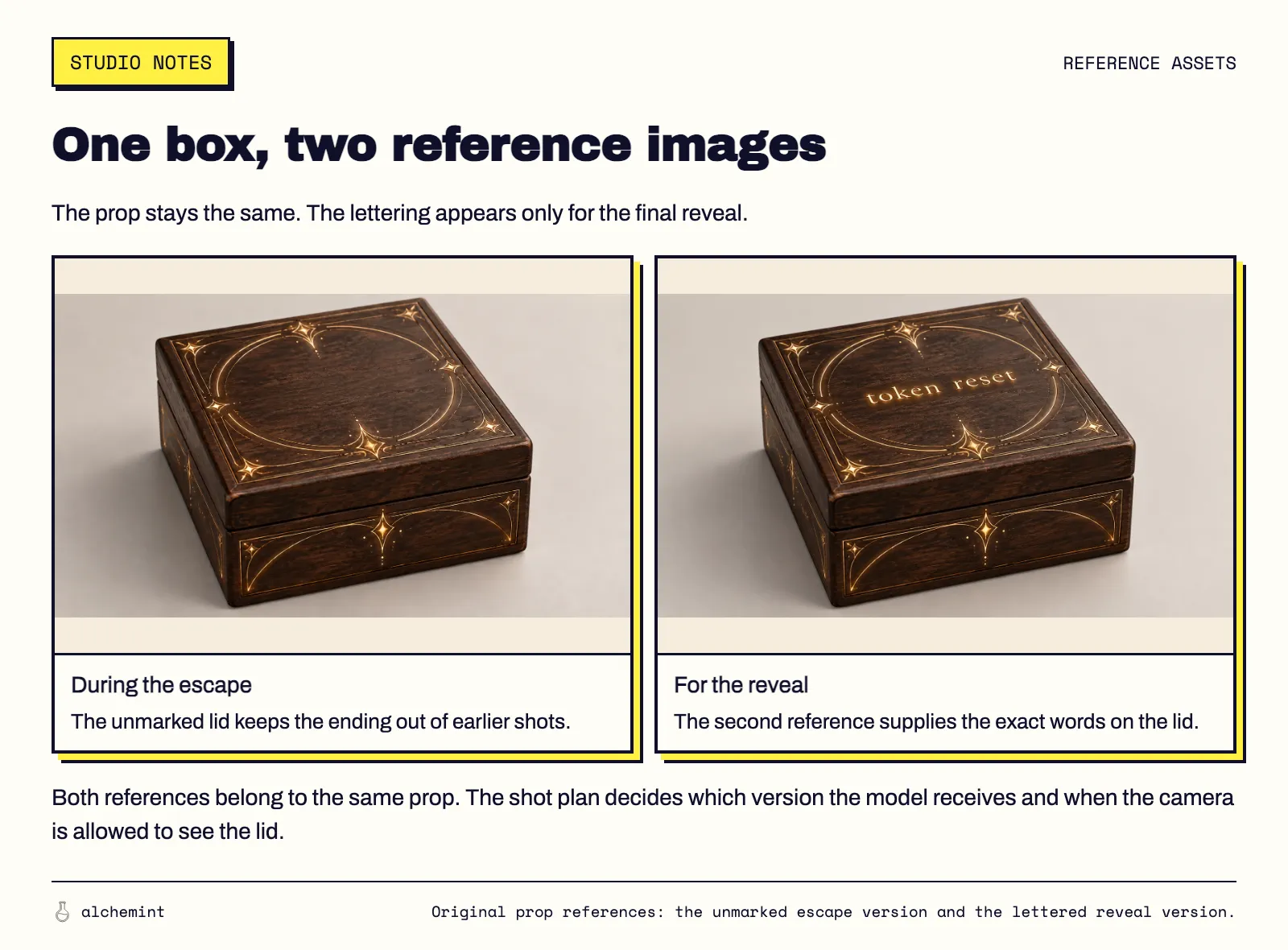
Two appearances of the same prop serve different points in the story. The text chooses which one belongs in the current scene.
Excerpts from the market and rooftop source clips show the box carrying different information at different moments. These are story examples; the two images above are the prepared prop references.
Who holds the box, which actions change that, and when the audience should learn what is written on it all deserve explicit instructions. They affect how the audience understands the event, even when most of the movement is already visible.
Don't use prose to argue with a broken reference
The night-market handoff had once been hidden behind a pedestrian. We repaired the camera before asking the model to follow it. Adding a sentence that demanded a visible hand while supplying a video that obscured it would give the model a conflict to resolve. The previz article shows that repair and the separate problem of a character opening an already-open door.
There is a practical difference between repeating an event to remove ambiguity and rebuilding the whole scene in prose. “Shami holds the only box after the catch” protects a state that matters. A second account of which corridor connects to which exit can become stale as soon as the rehearsal changes.
I would keep the first sentence and make the video authoritative for the second decision. When the chosen route changes, update the reference and any text that actually depends on it. Don't leave the old route attached to the new camera.
Before submitting, read each reference instruction while looking at the file it names. The useful questions are concrete: which person is this, which parts of this image do we want, and which visible details would be wrong in this scene? A prompt that answers those questions has a job even after the choreography is settled.
For a fill-in template, see Prompt Engineering for Seedance 2.5. To move the same previz to MiniMax H3, see the porting guide.