
AI Video Camera Moves: Pan, Truck, Dolly and Zoom Explained
Turn a shot idea into a clearer AI video prompt. Learn camera movement terminology, distinguish commonly confused moves, and separate filmmaking language from model-specific commands.
“Move the camera to the right” can mean sliding sideways or turning right from a fixed position. “The shot moves right” could even be interpreted as the character moving.
Reduce ambiguity by stating what moves, how the camera moves, and what the shot should reveal. Camera terminology expresses those choices concisely. You still need to check whether the generated video follows them.
This guide explains filmmaking terms first, then separates out model-specific syntax. The diagrams illustrate camera geometry; the prompts are examples to adapt. Neither represents a benchmark of model performance.
Start with position, orientation and field of view
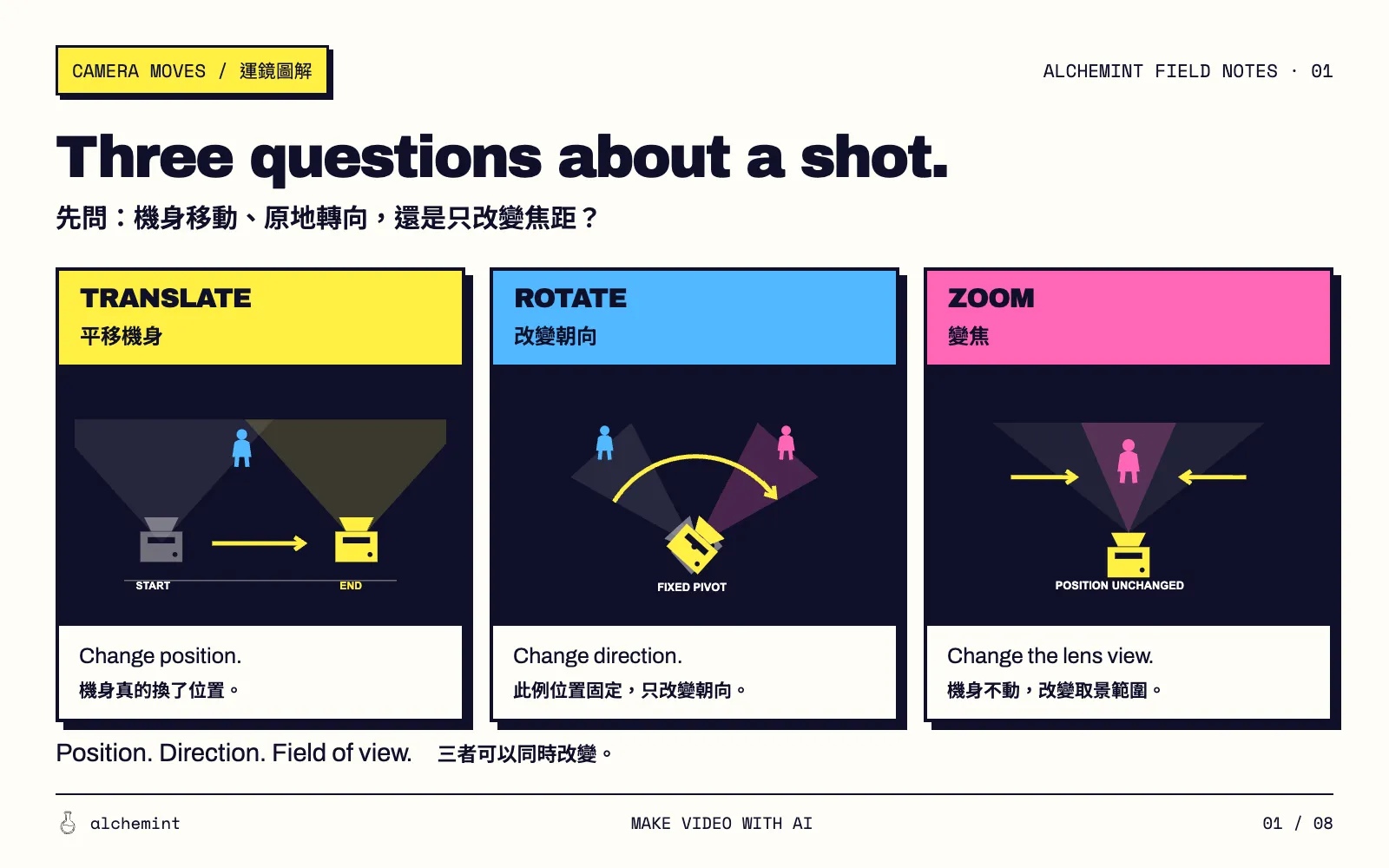
Break down a camera move with three questions:
- Does its position change? Moving forward, backward, sideways, up or down is translation.
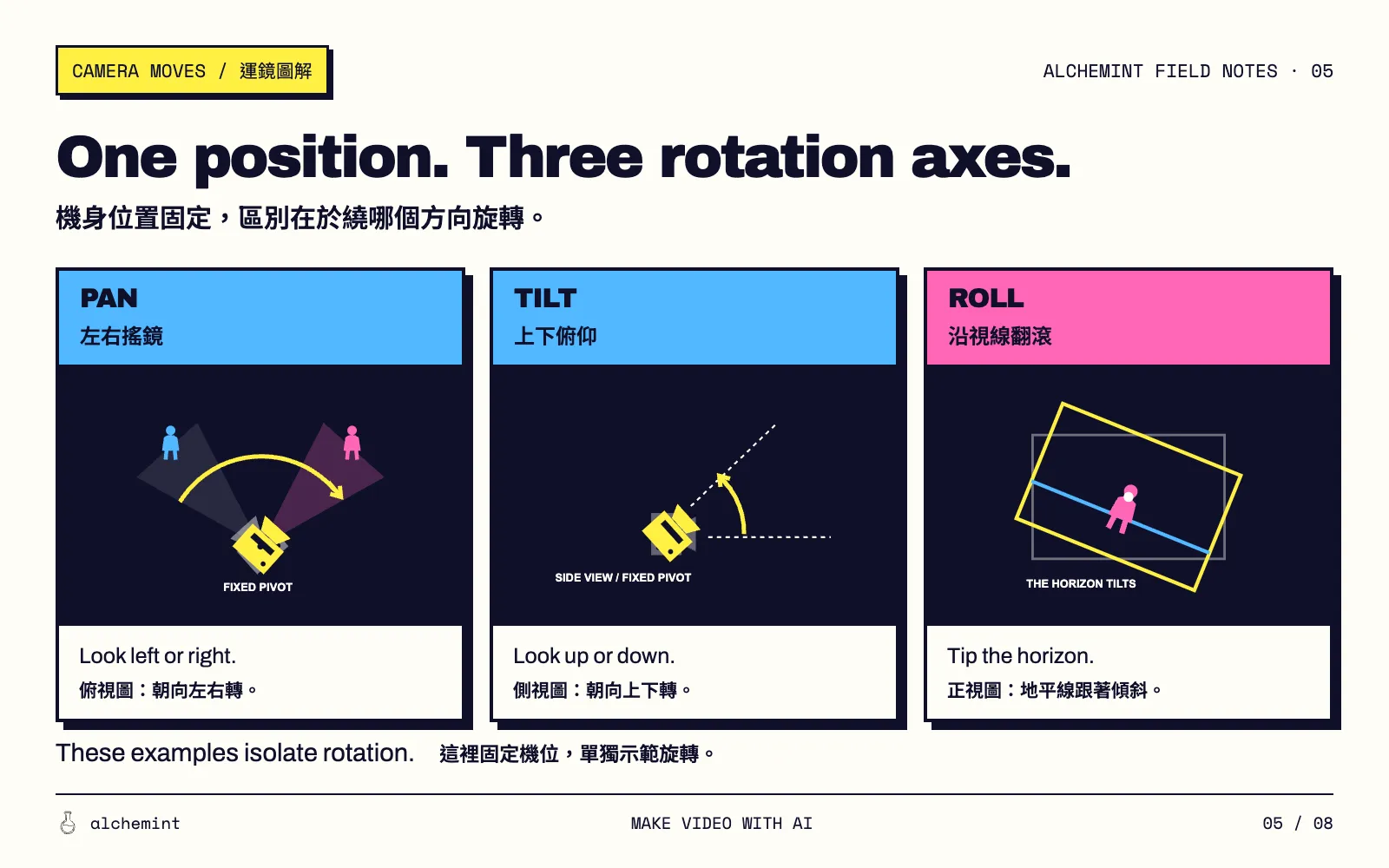
- Does its orientation change? Turning horizontally, tilting vertically or rolling around the viewing axis is rotation.
- Does zoom change the field of view? With a fixed sensor capture area, increasing focal length narrows the view; decreasing it widens the view.
These are dimensions of analysis, not an exhaustive list of camera operations. They can occur together. Focus, exposure, shot size and editing require other descriptions.
A close-up describes framing without specifying how the camera reaches it. A rack focus shifts the plane of focus; it does not inherently require camera travel or zoom.
Common camera terms and what they specify
These are filmmaking terms, not a universal API command list. Usage overlaps, so describe the intended movement alongside its name.
| Term | Meaning used here | What to add |
|---|---|---|
| Truck left / right | Move the camera sideways | Whether it also turns or follows a subject |
| Push in / Dolly in | Move toward the subject | Ending distance or framing |
| Pull out / Dolly out | Move away from the subject | What the retreat reveals |
| Pedestal up / down | Raise or lower the camera | Whether orientation stays fixed |
| Pan left / right | Turn horizontally | The target and stopping point |
| Tilt up / down | Angle upward or downward | Starting and ending view; whether position stays fixed |
| Roll | Rotate around the viewing axis, tilting the horizon | Image tilt direction and amount |
| Zoom in / out | Change focal length to narrow or widen the view | Whether position stays fixed; ending framing |
Pan, tilt and roll can accompany translation. The illustration below holds position fixed to isolate rotation. See the definitions of pan and tilt, and DJI's three-axis gimbal diagrams.
Dolly, truck and tracking are not exact synonyms. A dolly is a wheeled camera support. Dolly in/out specifies travel toward or away from a subject; “dolly shot” alone does not specify direction. Truck emphasizes lateral travel. Tracking commonly means moving with a subject, though broader uses exist. One shot can fit several descriptions without making them interchangeable. Terminology comparison.
Truck versus pan: move right or look right?
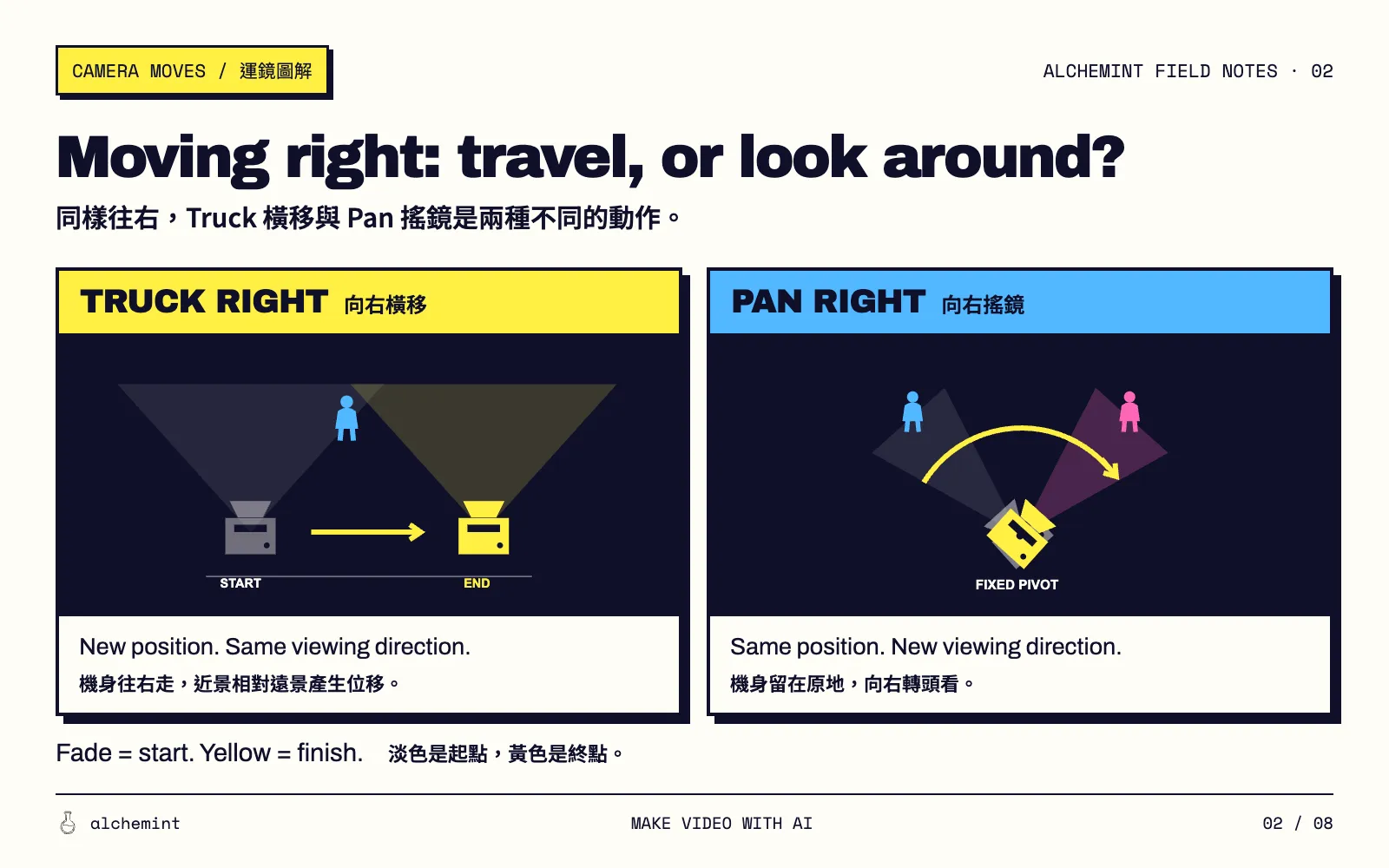
A truck can take the viewer past a shop window. A pan can survey a room from doorway to window while the camera stays in one corner.
During lateral travel through a scene with depth, nearby objects usually shift more than distant ones. Foreground window frames and distant buildings make this translational parallax easy to observe. Nikon's slider demonstration.
An ideal pan rotates around the projection center without the depth-dependent parallax caused by translation. That does not mean every part of the image slides sideways equally. Real equipment rotating about an offset point can introduce parallax, especially with nearby objects. Rotation and translation in image formation.
For a truck:
The camera trucks slowly to the right past a foreground window frame, keeping its viewing direction and focal length fixed. The distant buildings shift less than the nearby frame.
For a pan:
From a fixed position in the corner of the room, the camera slowly pans right from the doorway to the window and comes to a stop.
Left and right describe the camera's travel or turn, not a requirement for objects in the image to move in the same direction.
Push in versus zoom in: the subject grows for different reasons
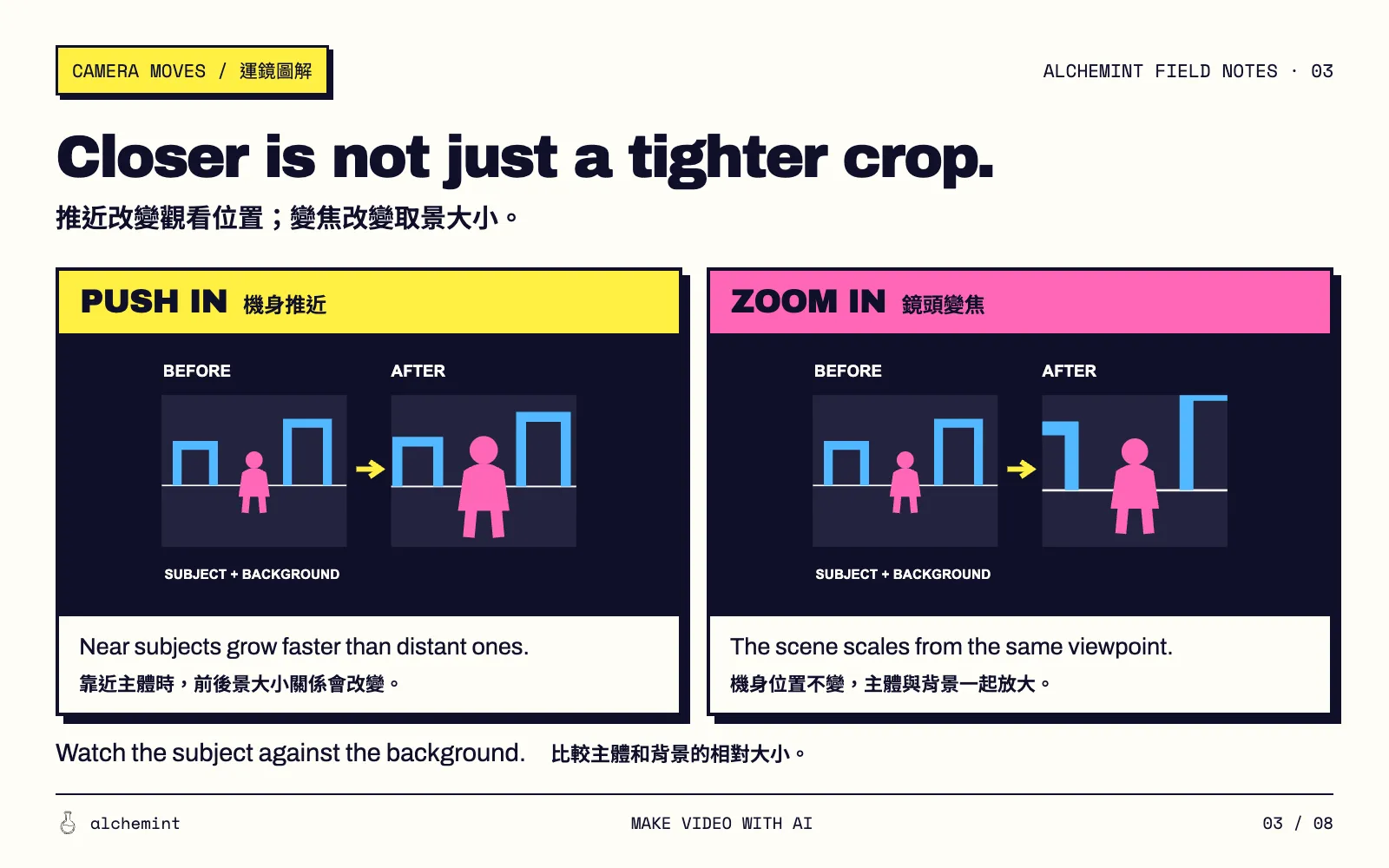
A push-in changes viewpoint. With a stationary subject, more distant background and fixed focal length, advancing along the viewing direction enlarges the subject proportionally more than the background. Occlusion and visible surfaces may also change.
A zoom-in changes focal length. From a fixed viewpoint, ideal perspective relationships remain the same as the view narrows. Optical zoom is not literally image cropping: real lenses can also change depth of field, distortion and image quality. Zoom shot definition.
“Get closer to her face” leaves this choice unresolved. Specify travel when the viewpoint should approach; specify zoom for a tighter view from the same position. Neither has one mandatory emotional meaning.
The woman stands still beside the window. The camera slowly pushes toward her, keeping the focal length fixed, and ends on a close-up of her face.
“Pushes toward her” describes movement; “ends on a close-up” describes destination framing.
Pedestal versus tilt: raise the camera or look upward?
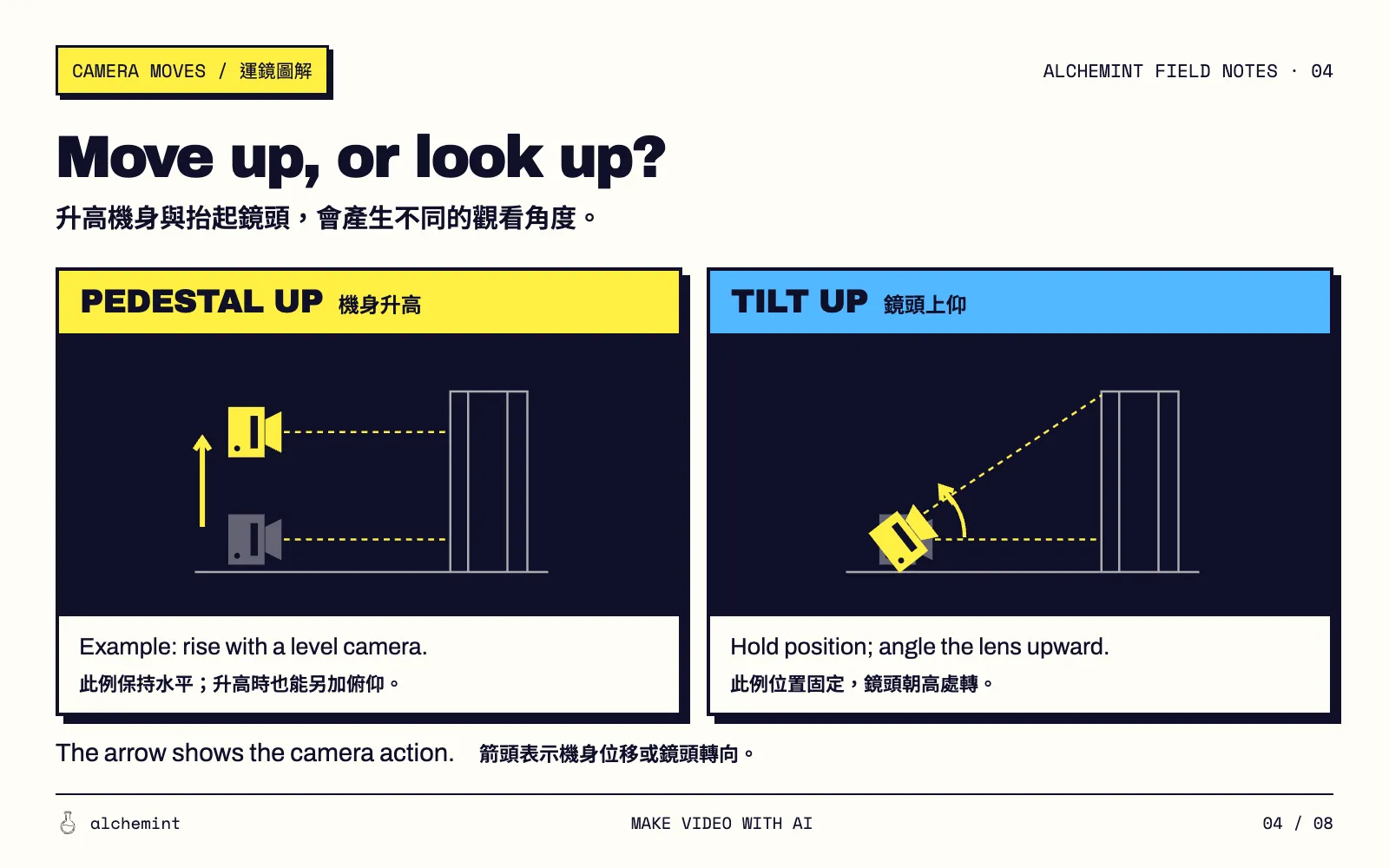
Pedestal up changes height; tilt up changes orientation. Keeping the lens level is an additional instruction, not an inherent property of a pedestal move. A rising camera can tilt down simultaneously. Vinten on camera elevation.
In ideal rectilinear projection, a level camera without roll can keep a building's verticals parallel. Tilting upward generally makes them converge toward an upper vanishing point. Perspective convergence differs from lens distortion that bends straight lines. Pedestal movement does not guarantee distortion-free product footage.
“Reveal her face from her shoes” could use a tilt, a rising camera, or both. Decide whether the viewpoint should rise before choosing the term.
Tracking, orbit and crane describe different aspects of a shot
Tracking: follow the subject, with distance specified separately
A tracking shot commonly moves with a subject: alongside, behind, or retreating ahead of them. Distance can remain fixed or change. The word alone does not lock framing; this guide uses it in that common subject-following sense. Adobe on tracking shots.
The camera tracks beside the cyclist as she rides along the waterfront, matching her speed and holding a medium side view.
Matching speed and holding a medium side view are choices for this example. A fixed-position pan can also keep a moving subject in frame, so panning does not necessarily lose the subject.
Orbit / arc: specify the starting and ending view
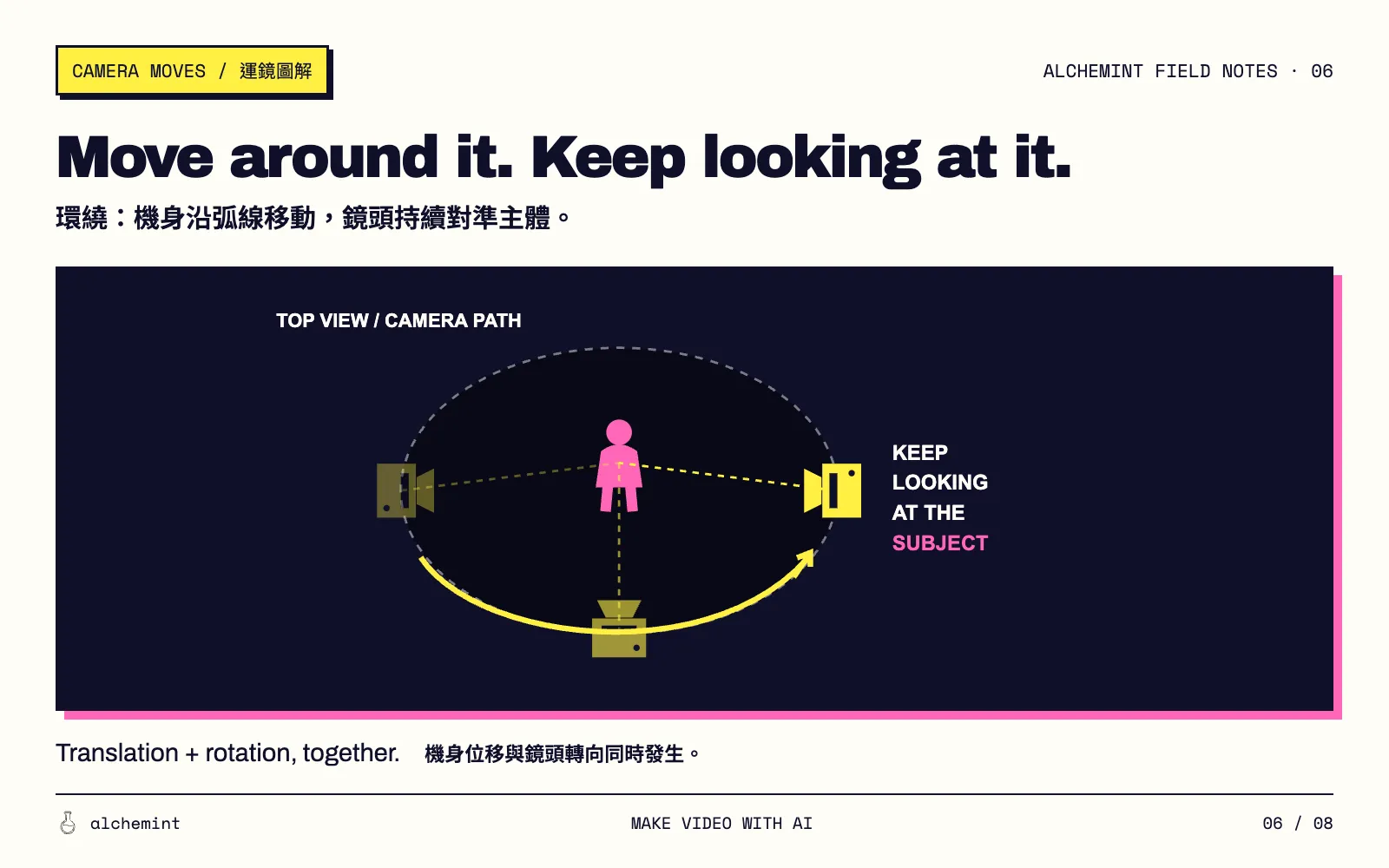
Orbit and arc overlap as terms for curved travel around a subject. Neither name reliably specifies whether the camera completes a full circle. Centering requires re-aiming; constant distance, size and height need additional instructions. A centered subject still reveals different sides as viewpoint changes. Arc shot usage.
Instead of only writing “orbit right,” specify the views:
Starting directly in front of the stationary sculpture, the camera moves along a quarter-circle to its left side, ending on the sculpture's left profile. Keep the sculpture centered at a steady distance and height.
Crane / jib: equipment terms, not a fixed movement formula
Crane and jib refer to camera-support equipment enabling rising, falling, sweeping or arcing travel. Camera orientation can be controlled separately. A physical jib often follows an arc; it is not automatically a straight vertical pedestal move. Jimmy Jib manual, crane shot explanation.
If you want the camera to rise while looking down at a character, describe both actions. That is one crane-shot design, not the definition of every crane shot.
Dolly zoom: hold subject size while background proportions change
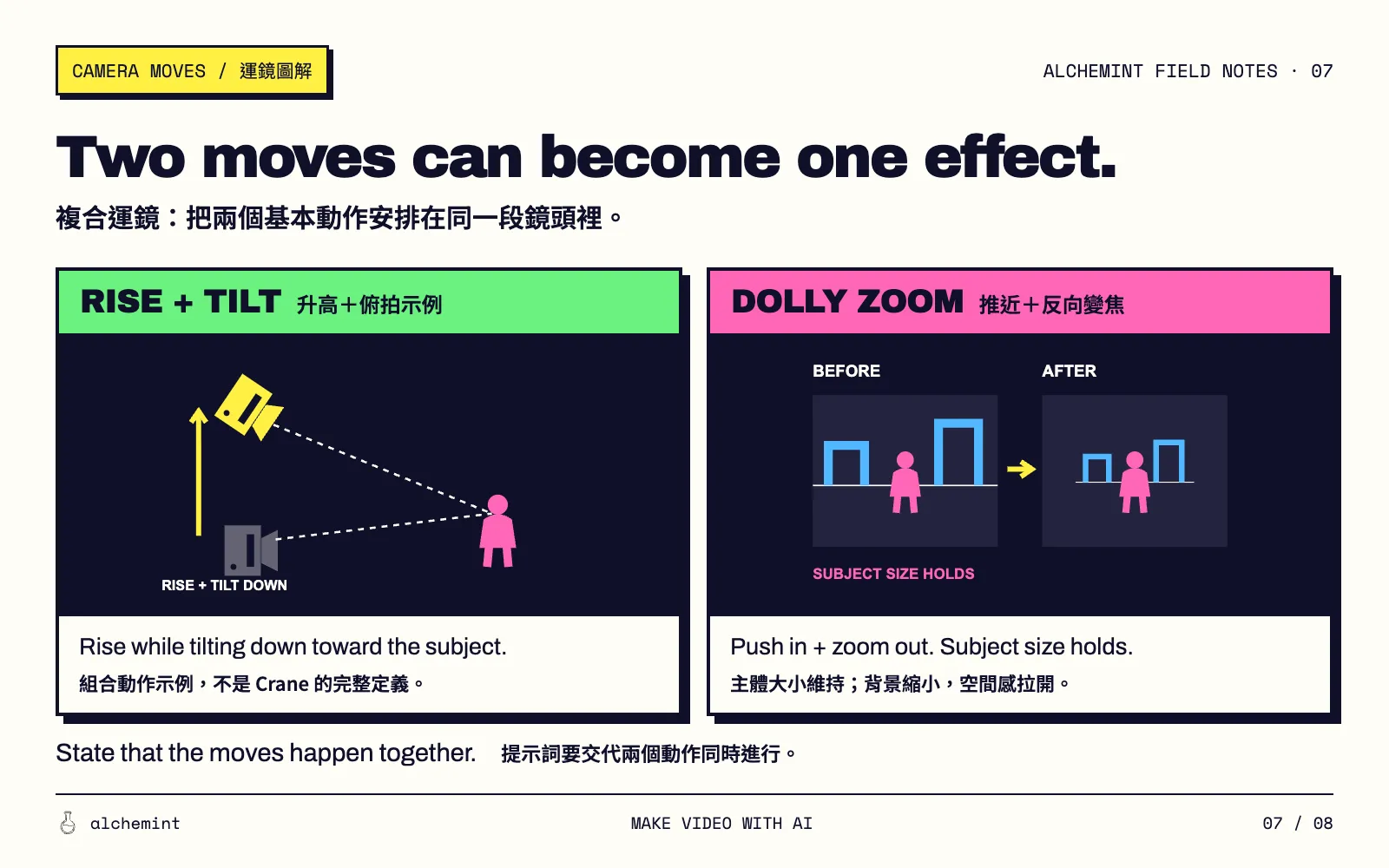
A dolly zoom coordinates camera travel and focal-length change to keep a chosen subject approximately the same size in frame while background proportions change. Merely moving and zooming together does not ensure the effect: their rates must be coordinated. Dolly zoom definition.
For a stationary subject and a stationary background farther away, with travel along the viewing direction and subject size held constant, perspective geometry gives these different results:
| Simultaneous actions | Background relative to subject |
|---|---|
| Move toward the subject + zoom out | Becomes smaller; depth appears extended |
| Move away from the subject + zoom in | Becomes larger; depth appears compressed |
The diagram shows the first case:
The man stands still in front of a distant building. The camera moves toward him while simultaneously zooming out, keeping his head the same size in frame as the building becomes smaller behind him.
Check subject size and background proportions in the result. Uniformly scaling the entire image does not meet this shot description.
Static, handheld and shake describe stability separately
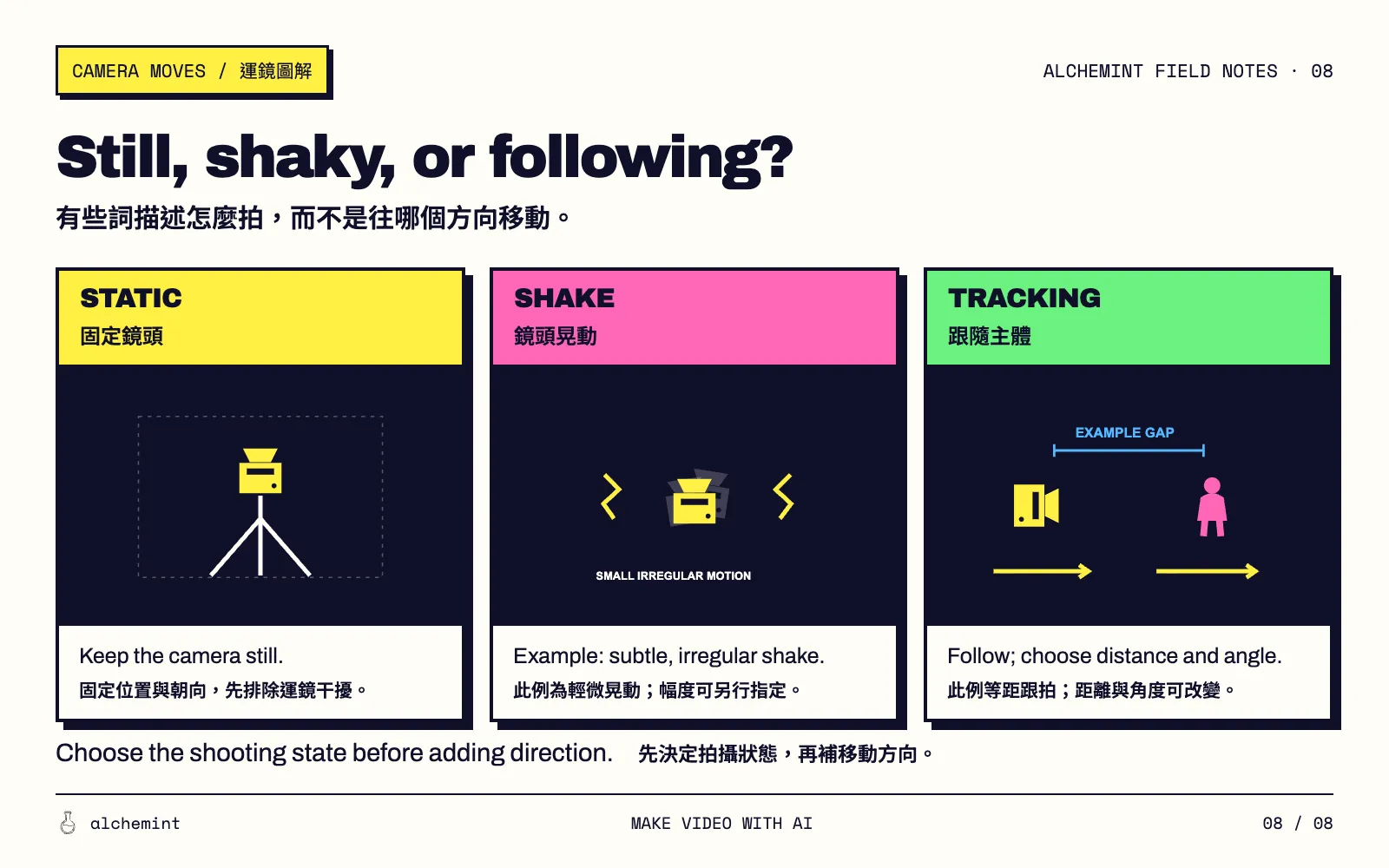
A static shot keeps the camera fixed while subjects and scenery can move. To lock framing as well, specify fixed orientation and no zoom. Static shot definition.
Handheld describes a support method. It can produce visible movement or be quite steady. Shake describes an effect ranging from subtle to violent; it is not synonymous with every handheld shot. Specify the amount you want. Handheld camera rigs.
Stability and path can be combined: tracking can be smooth or visibly handheld. When diagnosing a difficult shot, try the subject action with a static camera before adding travel.
Turn an idea into a prompt by adding the missing conditions
Start with subject and action → camera path or turn → what stays consistent → ending composition.
| Initial idea | Missing decision | Clearer wording |
|---|---|---|
| Move right | Travel or turn? | Truck right with a fixed viewing direction. / Pan right from a fixed position. |
| Get closer to his face | Change viewpoint or tighten the view? | Push toward his face at a fixed focal length. / Zoom in on his face from a fixed position. |
| Go from shoes to face | Does the viewpoint rise? | From a fixed low camera position, tilt up from her shoes to her face. |
| Rise above him | Does the camera also re-aim? | Raise the camera while tilting down to keep him centered. |
| Circle the product | Which starting and ending sides? | Arc from the front of the product to its left profile at a steady distance. |
| Follow him | Follow from where, with what framing? | Track behind him as he walks, keeping a full-body view. |
| Make the image feel off-balance | How should the horizon tilt? | Gradually roll the camera so the horizon slopes downward to the right in the image. |
Specify a single continuous shot when needed. Use “then” or “after” for sequential actions. Angles, distances and timing communicate intent, but models may not execute numeric values precisely.
Model syntax: MiniMax brackets are not universal commands
MiniMax: use brackets only where support is documented
As checked on September 14, 2026, the text-to-video reference lists bracket support for MiniMax-Hailuo-2.3, MiniMax-Hailuo-02 and T2V-01-Director. Do not extend that list to H3 or other endpoints without checking. MiniMax API reference.
| Movement | Listed syntax |
|---|---|
| Truck | [Truck left], [Truck right] |
| Approach / retreat | [Push in], [Pull out] |
| Elevation | [Pedestal up], [Pedestal down] |
| Pan | [Pan left], [Pan right] |
| Tilt | [Tilt up], [Tilt down] |
| Zoom | [Zoom in], [Zoom out] |
| Shake / track / static | [Shake], [Tracking shot], [Static shot] |
The reference recommends up to three simultaneous commands per bracket; prose can sequence actions. Roll, orbit and dolly zoom are absent from this named list. Describe their effects rather than inventing bracket commands. Use the listed [Pull out] for retreat.
Seedance 2.0: describe the shot in natural language
The guide recommends clear subjects, actions, setting, camera movement and event order. It advises trying one movement type per shot to reduce instability. This is guidance, not a one-movement capability limit or a statement that MiniMax brackets are supported. BytePlus prompt guide.
When changing platforms, preserve the visual intention and adapt the syntax. Natural-language prompts, interface presets and structured API parameters are different controls. A restriction on one does not automatically apply to the others.
Check what the generated camera actually does
Compare the beginning, middle and end, then watch the full clip. Three frames help inspection but cannot establish continuity on their own.
- What moves? Does the camera travel, or does only the subject move?
- Are position and orientation right? Look for an unintended pan instead of a truck, or drift in a supposedly fixed shot.
- Do subject and background relate correctly? A push-in, fixed-position zoom and dolly zoom should not produce identical scaling.
- Does the ending composition arrive? Check the intended profile, full-body framing or facial close-up.
Correct the most consequential ambiguity before adding another movement. Camera vocabulary lets you name what went wrong and specify the next change.
For subjects, setting and timing, continue with the Seedance prompt tutorial. For differences in prompt organization, see the same sentence across two models.
Rewritten and source-checked on September 14, 2026. Filmmaking definitions, geometric explanations and model syntax are distinguished, with sources linked at the relevant passages. Actual prompt adherence still needs to be assessed on the selected model version.