Fight Choreography You Can't Write Down? Give Seedance a Depth Video
The fight in your head is unreasonably hard to write as a prompt. We ran a Sekiro playthrough recording through Video Depth Anything and sent the depth video to Seedance 2.5 as the motion reference.
Writing a fight scene as a prompt is unreasonably hard.
Who moves first, what angle the blade comes down at, which way the other one gives ground, where the camera sits at that moment, whose turn it is on the next beat. In your head it runs as one continuous stretch of picture. On the page it becomes a dozen sentences, and when you're done you still can't tell whether the model read the same scene you meant. What comes back is wrong, you change a line, you send it again, and the credits go one round at a time.
In our last piece, Can Blender Previz Save Seedance Credits?, we built the motion ourselves in Blender. This time we tried something lazier: take footage we already had, pull a depth video out of it, and use that as the motion reference.
The footage is a recording of my own Sekiro playthrough. Something I'd kept around to watch, nothing more.
Depth video as a motion reference: the workflow in one line
Playthrough recording, depth video from Video Depth Anything, depth video into Seedance 2.5 as the motion reference.
Four panels, same second in each. My recording is top left, the depth video top right, the generated result bottom left.
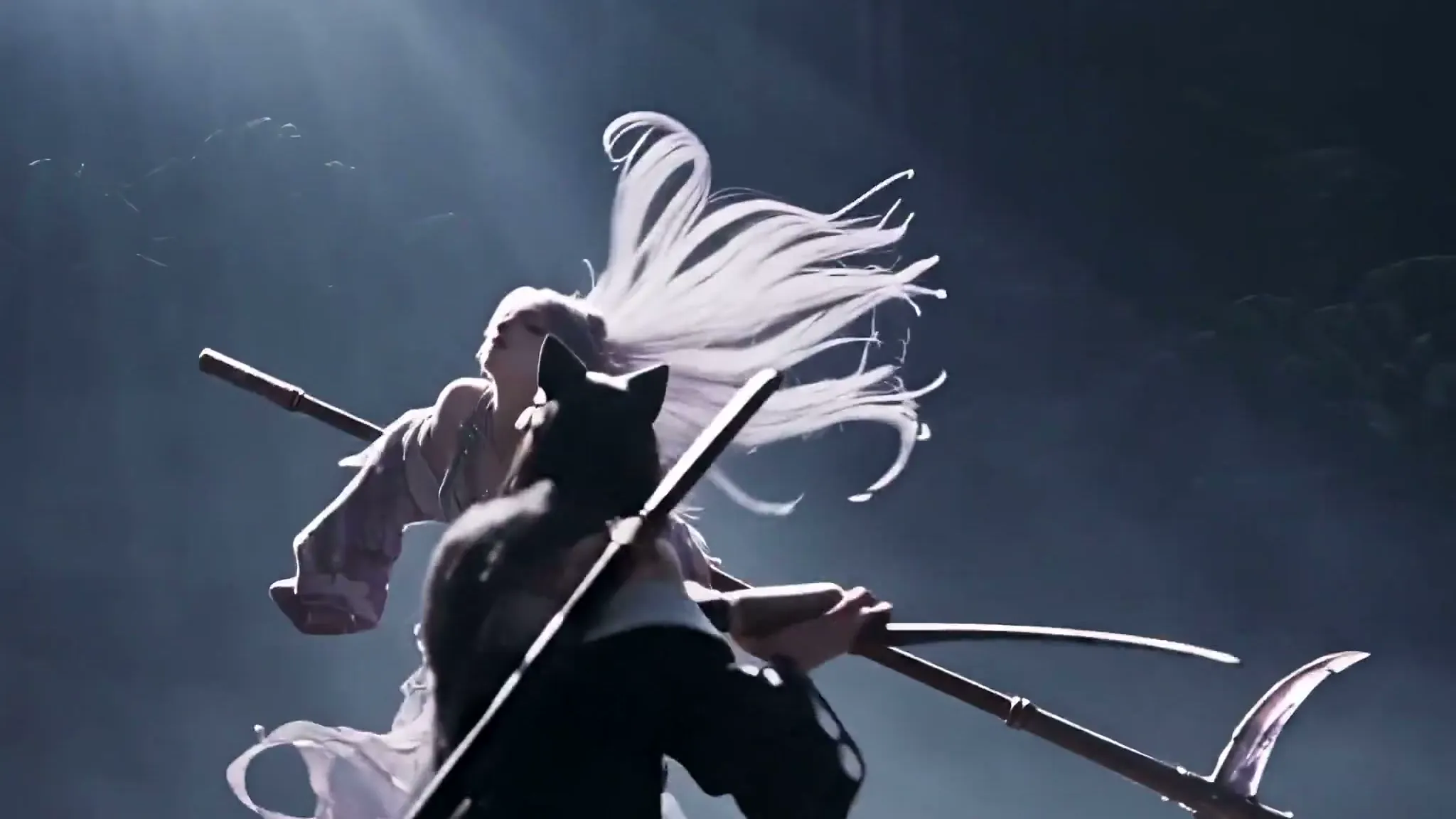
The footage is my fight with Isshin, the Sword Saint, with one character in the upper half of the frame and one in the lower. Both were replaced: the upper one with a white-haired character, the lower one with a black-haired character with cat ears, each from a reference image. The snowfield became a dark, misty stage.
All of that look came from the prompt, not from the model deciding for itself. Exactly one thing was left to the depth video: how the two of them move. And it did move them — the rock is still on the right where it was, the characters still walk the same path, and the camera still closes in when the action closes in.
A little after second 3, the camera suddenly cuts to a face. We'll come back to that shot; it was the most interesting part of the run.
Not one line of that prompt describes the fight
Here's an English translation of the prompt we submitted in Chinese. We've replaced the asset UIDs with readable names, and changed nothing else.
[Goal]
Generate a Hollywood-realistic live-action fight video, 85mm lens. The characters' movement follows the action reference video. Facial expressions should match the tension of whatever the character is doing at that moment.
[Action reference video]
[depth video] is a depth video, to be used as the characters' action reference video.
[Character reference images]
[character 1 reference] is character 1, replacing the character in the upper part of the frame.
[character 2 reference] is character 2, replacing the character in the lower part of the frame.
[Consistency]
The depth video is the action reference. Where consecutive frames are entirely grey, read them as the light-and-shadow effects of the character's preceding move.
The characters' physical appearance in the video must strictly follow the character reference images.
The model may improvise the facial expressions.
[Prohibited]
No misplaced characters, no deformed hands or feet. No video-game HUD of any kind, no game health bars, no game charge meters, no game damage indicators, no game character status indicators. No such screen elements at all. Do not alter the characters' physical build or muscle definition as given in the reference images.
Pull it apart. Exactly one sentence covers the fighting: "The characters' movement follows the action reference video."
Everything else handles something other than choreography. One sentence of style (Hollywood-realistic action, 85mm), two of identity (who replaces whom), three on consistency, and a whole paragraph of prohibitions. Who strikes first, what angle the blade comes down at, how the other one blocks, when the camera pushes in — not a word. All of it went to the depth video.
So how would you write this fight choreography out?
I tried writing those 8.8 seconds back into words. Note that I'm copying from the clip that already exists, which is far easier than imagining it from nothing:
Open on a wide shot. A tall rock stands on the right of frame, two characters set apart one above the other, the lower one holding a polearm. At one second the character moves right, the spatial relationship unchanged. At two seconds they reach the front of the rock and a shaft of light comes down over them. At three seconds they drop low into an attack and the right side of frame starts blowing out. At 3.2 seconds the camera pushes in to a close-up of the lower character's face; at 3.45 she turns to the lens; the camera then pulls back to the shoulders. At 3.8 seconds cut to the wide shot, a purple ribbon of light sweeping in from the left. At five seconds the ribbon resolves and the character returns to mid-frame, left of centre. At six seconds the camera pulls out, the character small under a column of light. At seven seconds she comes to a stop, polearm angled up. At eight seconds she lunges toward camera, nearly filling the frame…
And at that point I still haven't said how either character shifts their weight, which direction a strike travels, how the other one gives ground, or how far apart they stand. That's the part that actually is the fight.
Then the more awkward thing: every sentence above was copied off the screen. If describing footage that already exists runs this long, the scene that only exists in your head is worse, because there's nothing to copy from. You describe and imagine at the same time, and hope the other party fills in the gaps the way you would.
In the prompt we actually submitted, this entire section is one sentence: "The characters' movement follows the action reference video."
Why use a depth map instead of the raw footage as the reference?
Could the raw footage go in as the reference? It could, and plenty of tools accept it. But raw footage tells the model everything: the colour of the snow, the game UI, the health bar, the item slots, the tint of the sky. All I wanted was where things are, how close each one is to camera, and how they move. The rest is noise, and worse, it pulls the generation back toward the picture I was trying to leave behind.
A depth map flattens the frame into one statement: near is bright, far is dark. Colour goes, texture goes, and what's left is space and motion.
More is thrown away than kept. What's left happens to be exactly the thing text is worst at describing and the thing I most wanted to control.
One thing does not get thrown away, though, and it comes back worse: the game HUD.
Why the game health bar becomes the nearest object in the depth map
On the first attempt, the generated clip had game UI in it.
That was baffling at the time. I'd watched the depth video myself. It's a grey wash, and where the health bar sits there's a faint pale streak you wouldn't notice unless you went looking. The interface had already "gone". How was it coming back?
Reading up on how depth maps are made explained it. That pale streak is a layer the depth model pushed to the front.
Video Depth Anything is built on Depth Anything V2, and both papers are on arXiv (Video Depth Anything, Depth Anything V2, the latter at NeurIPS 2024). This class of model does monocular depth estimation: one camera, no stereo disparity, no depth sensor, and it still has to say how far every object in the frame is from the lens. Our run had metric set to false, so what comes out is relative depth, not metres.
Judging distance from a single flat image leaves only the cues in the picture itself: what covers what, how texture compresses toward the horizon, where the perspective lines converge, how large a familiar object appears. The strongest of those is occlusion — if A covers B and nothing covers A, A is in front.
A game HUD maxes that rule out. The health bar covers the background, covers the characters, covers everything, and nothing covers it. Hard edges, extreme contrast, no perspective. By the only rule available, it is the nearest object on screen.
So the depth map promotes the UI: a strip of text you'd overlook becomes the brightest, frontmost, strongest-signalling thing in the frame.
Crop the same corner from both and it's obvious: above, the source with the boss health bar and nameplate; below, the same frame in the depth map, two white bands floating at the front.
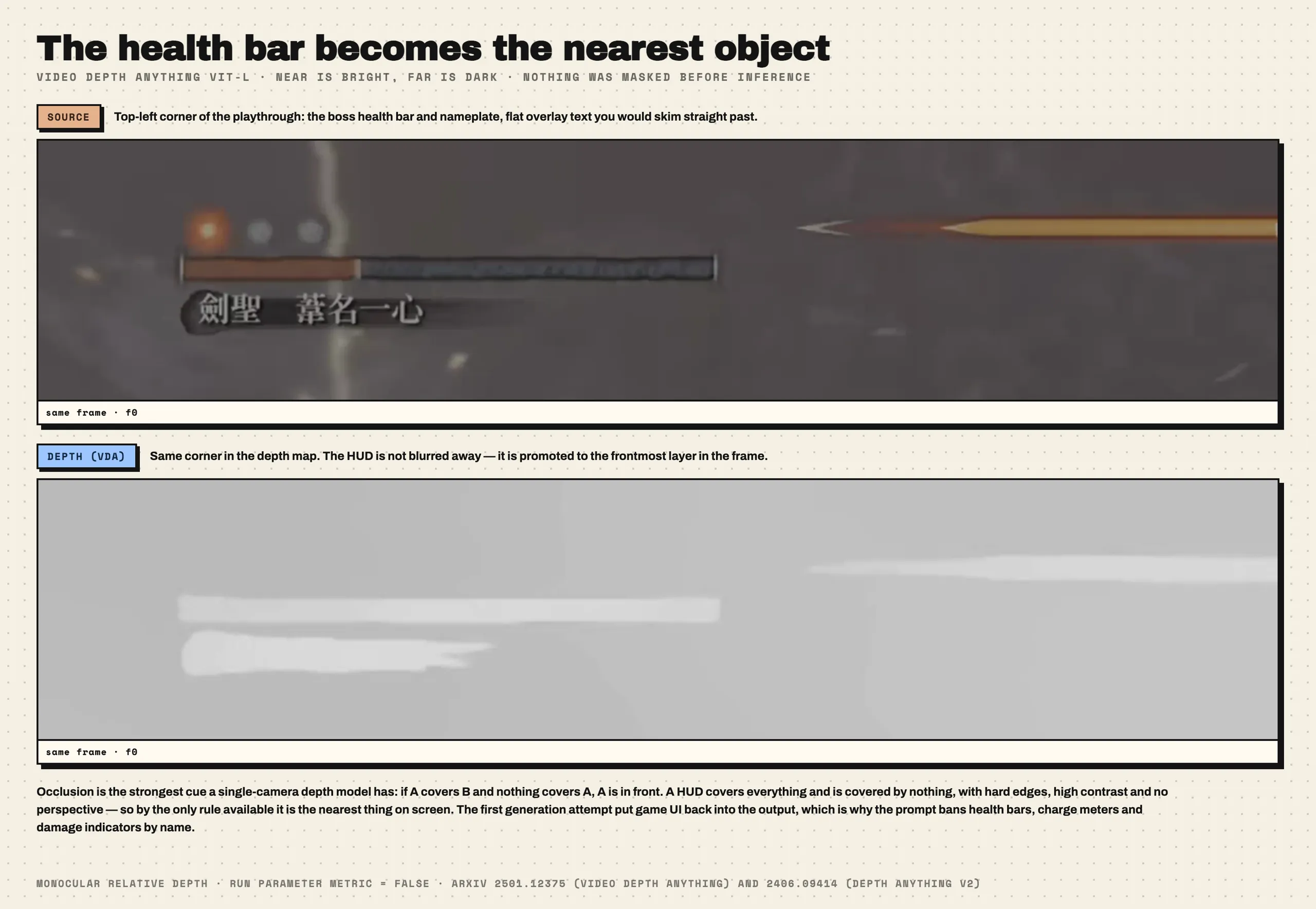
Knowing that, the paragraph of prohibitions stops being fussy. Health bars, charge meters and damage indicators get banned by name because they aren't just still in the reference video, they're the first thing the model sees. With the ban in place, not one of them made it into this generation.
You can also skip the whole problem by masking or cropping the UI out before running depth. We didn't, so we patched it with prohibitions instead.
How we made the depth video with Video Depth Anything
Video Depth Anything, Large encoder (ViT-L), FP16, input size 518, max_res 1280. The full 90-second segment, 2,160 frames, took 337.903 seconds to infer and write out, excluding deployment, upload and download. Peak CUDA allocation was 21,859.8 MiB. Output is 1280×726, SAR 121:120, 16:9 display, 24 fps, no audio track.
We cut four segments in the same batch (30–90, 90–180, 180–240, 240–330 seconds). They took 216.957, 341.605, 214.671 and 337.903 seconds respectively.
A fifth, 307 seconds long, failed. On the evening of 2026-09-08 the VDA subprocess was SIGKILLed and the 53 GiB container's oom_kill counter went from 0 to 1. That's host memory, not VRAM — the job had already dropped max_res to 960 and still couldn't hold it. The source clip was unaffected, but long clips need either a lower depth resolution or different memory handling, and we haven't gone back to that.
Each segment writes five variants: gray, body-contrast, body-bright, body-visible and color. The one we sent was body-visible. These variants make relative depth easier to see by adjusting the tones, ready to use as motion references.
What actually went in was seconds 50 to 60 of the 90-second segment: 10 seconds, 240 frames. The generated file came back at 10.033 seconds. Every comparison below starts 1.25 seconds into the depth clip, which is 51.25 seconds into the 90-second segment, with all three tracks aligned and trimmed to 8.8 seconds.
Does Seedance follow the depth video? Same second, three tracks
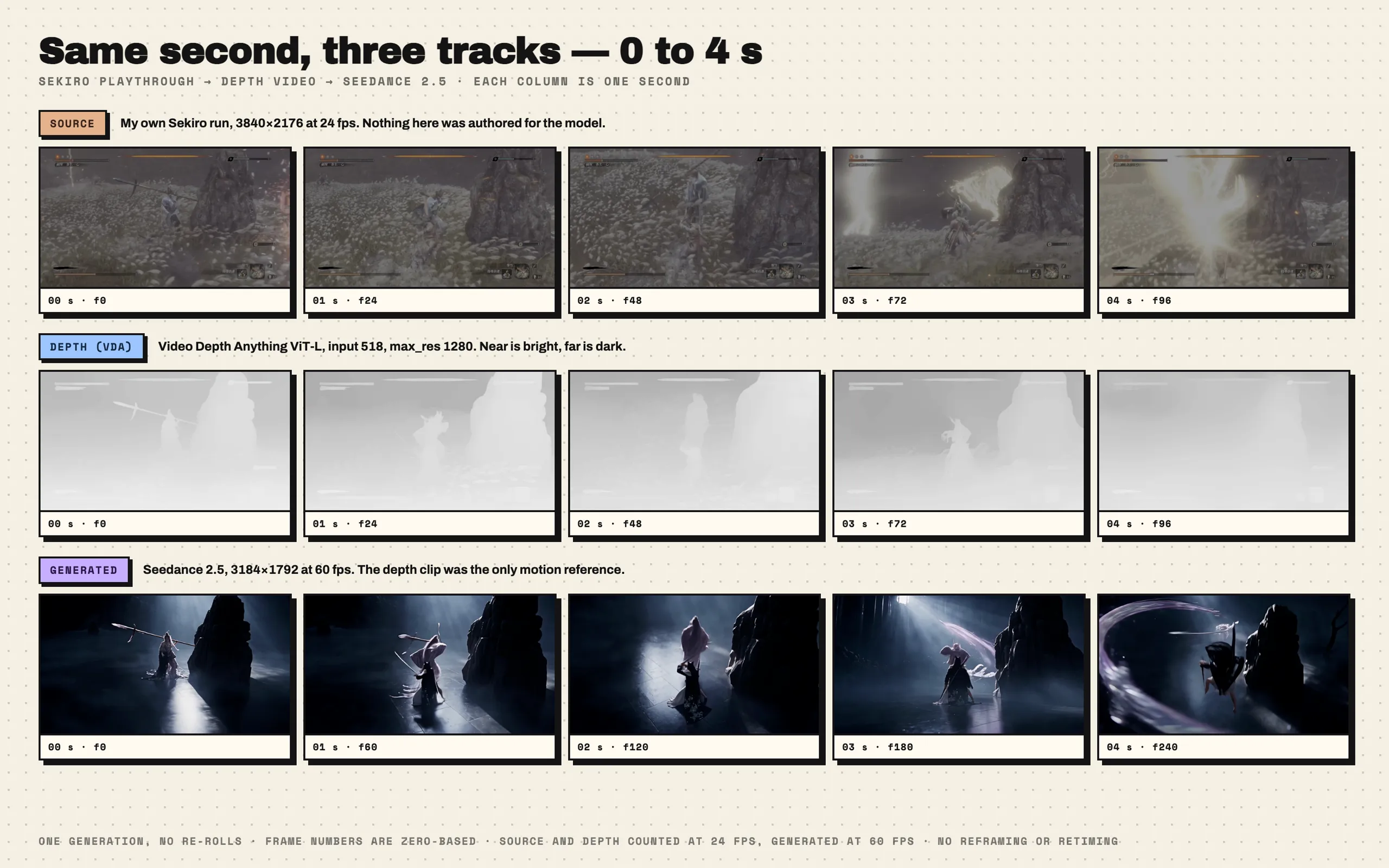
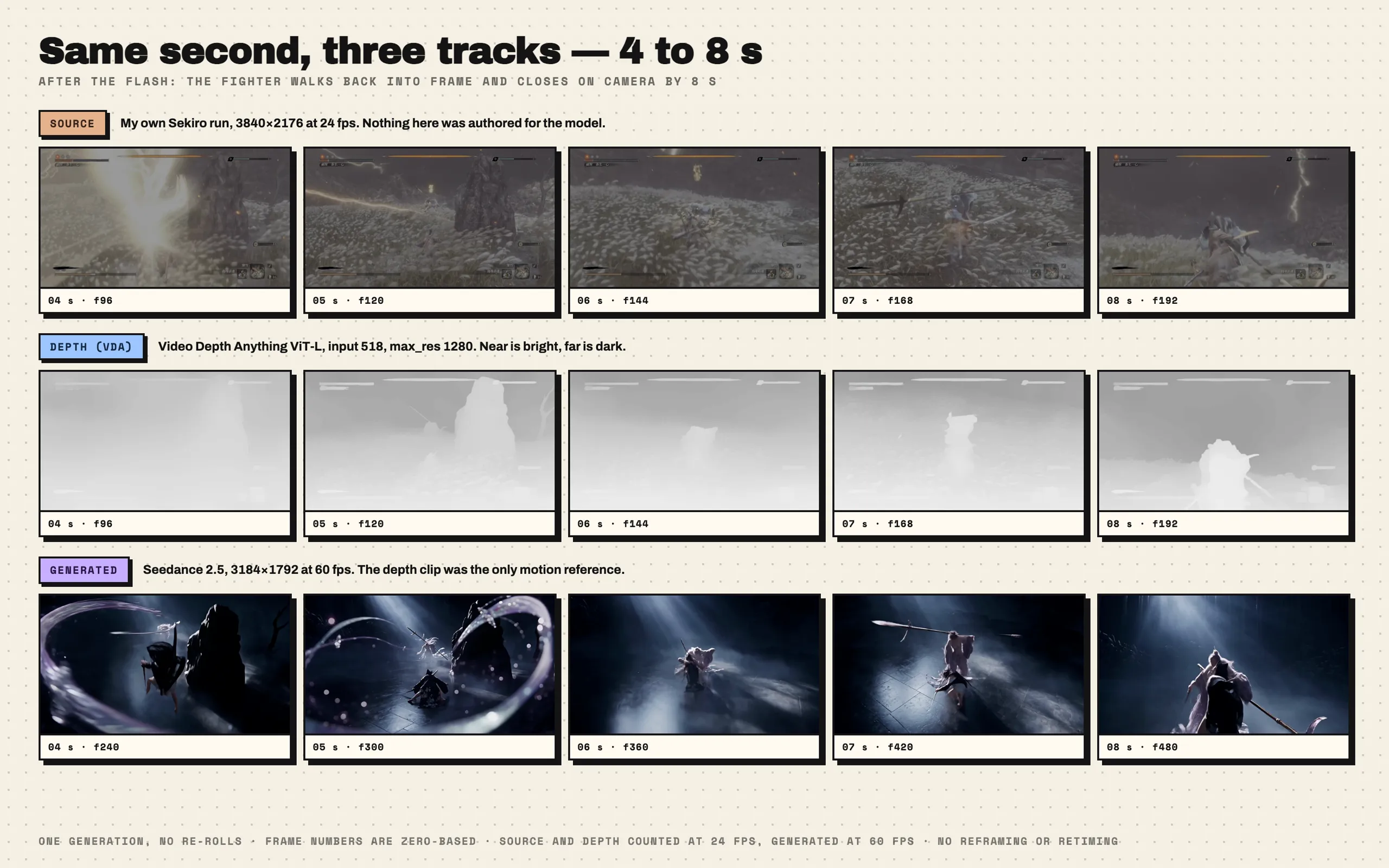
Frames pulled with FFmpeg, one second per column. Source and depth run at 24 fps and the generated clip at 60, so the frame numbers differ for the same second. Both are on the figures.
| Second | My recording | Depth video | Generated |
|---|---|---|---|
| 0 | Character left of centre, a tall rock on the right | The rock is one solid near-field mass, the character a thin bright strip | Rock in the same place, character on the left holding a polearm |
| 1 | Character moves right | The bright strip follows right | The character moves right too, in the same position |
| 2 | Character reaches the front of the rock | The two bright masses meet | Character in front of the rock, lit from above |
| 3 | The attack starts, the right side blows out white | Structure starts to smear | Character drops low into an attack |
| 4 | The flash covers the whole frame | Almost completely flat | A ring of light effects, the rock is gone |
The first three seconds hold up. Position, path and shot size all line up, and we never wrote a single line about the camera.
| Second | My recording | Depth video | Generated |
|---|---|---|---|
| 5 | The flash clears, character mid-frame | A large near-field mass, left of centre | Character on the same side, the light effect still resolving |
| 6 | Snowfield, character small | The bright mass shrinks | Character small under the light, framing matches |
| 7 | Character comes to a stop | A small bright mass, centred | Character stops, polearm angled up |
| 8 | Character lunges toward camera | A large near-field mass, bottom right | A close shot too, the figure nearly filling the frame |
Second 8 is the one to look at. In the source, that beat is the character lunging at the camera; the depth map's bottom right is a large block of "very close"; the generated clip answers with a close shot. The shot size came out of the depth map, and we didn't write a word about it.
Here's the generated clip in full, if you want to watch it through before reading on.
Those 22 frames, where the reference goes blank
When a big attack goes off in the game, the effects blow the screen out. We knew that going in, and the consistency block of the prompt says so:
Where consecutive frames are entirely grey, read them as the light-and-shadow effects of the character's preceding move.
It's the same principle as the health bar. A depth model reads the cues in the picture, and a uniform white field has none — no occlusion, no texture gradient, no perspective lines. Nothing to read means a flat output.
How long that stretch runs and how flat it goes, we measured with FFmpeg. All three clips were decoded to 320×180 grayscale at a common 24 fps, and two numbers computed per frame: the depth frame's spatial gradient (the mean absolute difference between neighbouring pixels within the frame, standing for how much structure that frame still carries), and the source frame's mean luma. Both are expressed as a percentage of their own median so they sit on one axis.
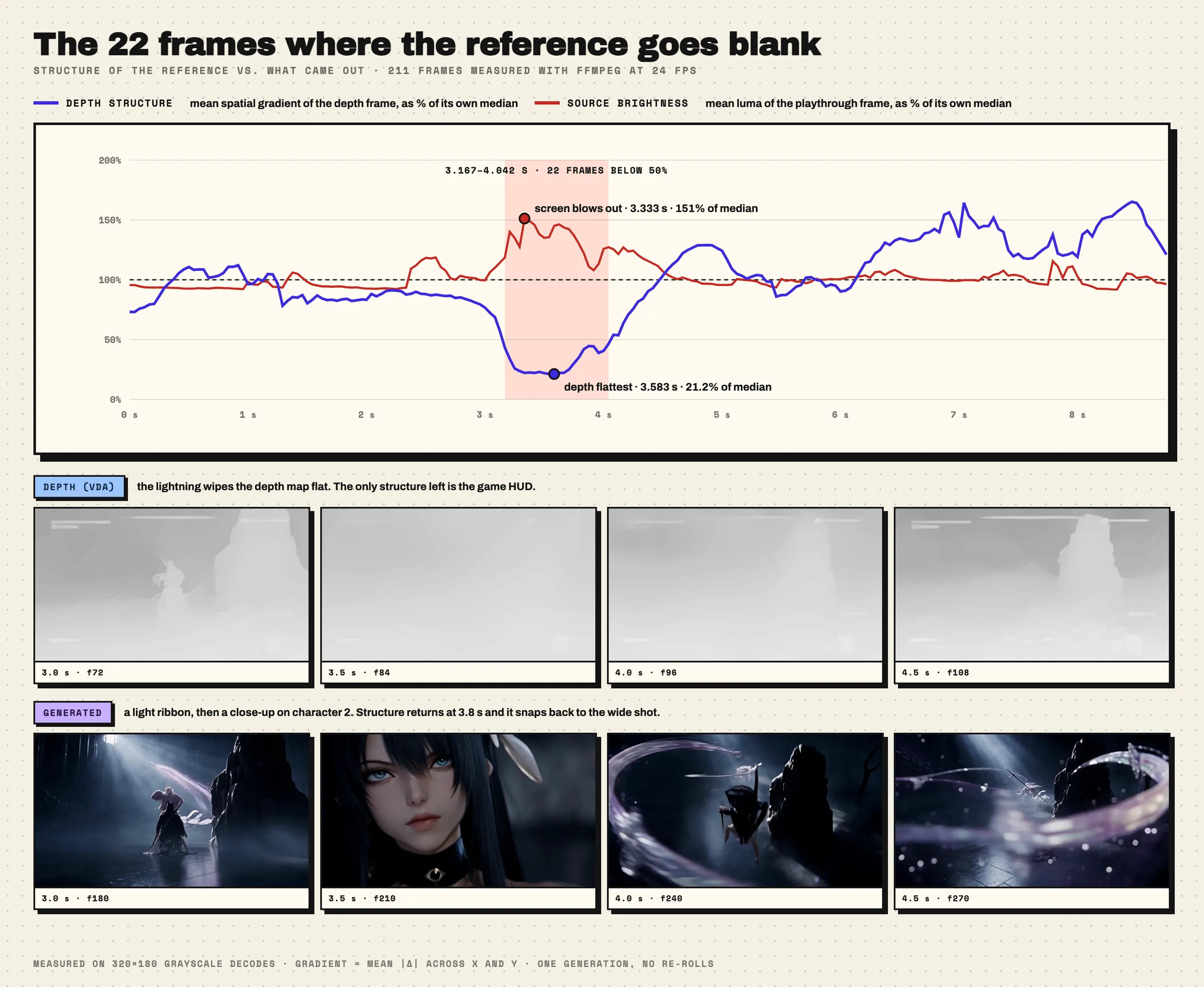
Source brightness peaks at 3.333 seconds at 151% of its own median. The depth map's structure goes down with it: between 3.167 and 4.042 seconds, 22 frames fall below half the median, bottoming out at 3.583 seconds at 21.2%.
The interesting part is that those 22 frames aren't empty. Once the characters and the rock have smeared away, the only structure left in the frame is the health bar we had explicitly banned.
We measured one more thing. Weighting each frame by its own motion (the frame-to-frame difference), we took the horizontal position where the motion is happening, and compared source against generated. Over the stretch where structure holds, the two differ by 6.6% of the frame width on average. Inside those 22 collapsed frames, 12.6%. Roughly double.
For those 22 frames the reference has nothing to say. So what did the model do?
The one shot nobody described
It shot an expression.
At about 3.2 seconds it pushes in on character 2's face. At 3.45 she turns to the lens. The camera then pulls back to the shoulders and the pendant at her chest. At 3.8 seconds the rock surfaces again and it jumps straight back to the wide shot, a purple ribbon of light sweeping across. The whole thing runs under six tenths of a second.
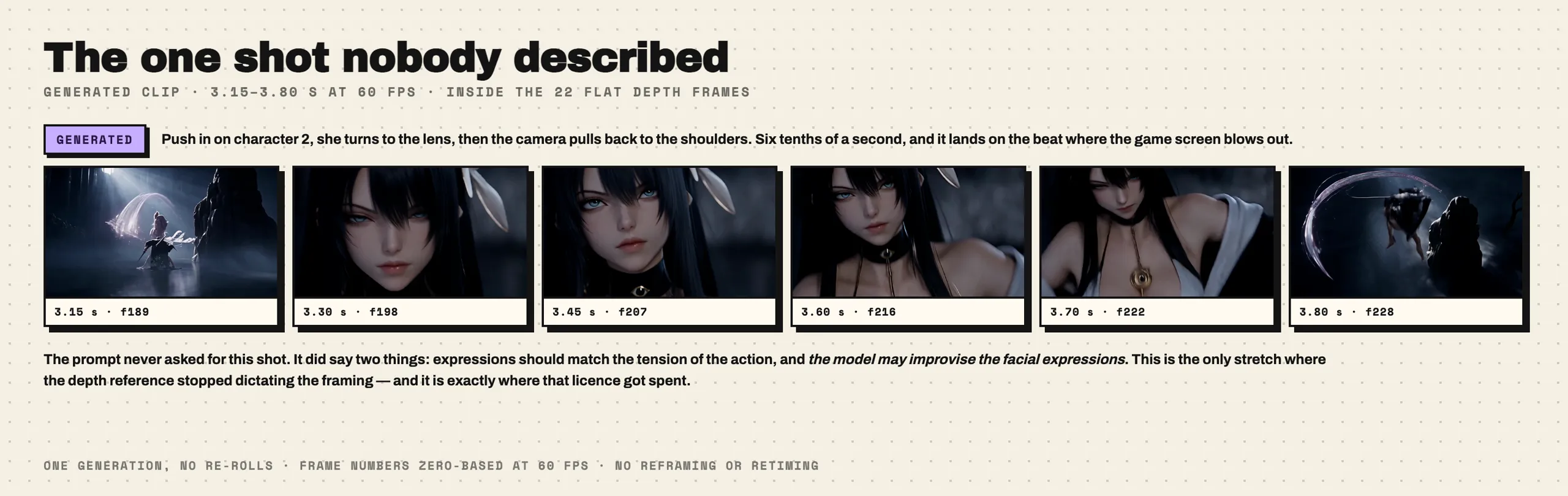
That shot does not exist in the reference video, and nothing in those depth frames looks remotely like a face. But it isn't invented either: the face is the one from character 2's reference image, down to the features, the ears and the eye set into the collar. Identity it held onto. The camera was its own call.
It also picked its moment well — the beat where the attack blows the screen out is exactly where it cuts to the face.
Going back to the prompt, this was something we allowed. The opening line asks that expressions match the tension of whatever the character is doing, and the consistency block says the model may improvise the facial expressions. Across the whole clip this is the one stretch where the depth video stopped dictating the framing, and the small amount of freedom we handed over got spent right there, all of it.
That's the part we find most interesting. A depth reference does two jobs. It ties the model down, and it marks out where the model still gets to work. Where the reference goes blank is where the freedom you granted gets spent. If you want the model to take a shot of its own, leave a blank there. If you don't, a sentence of guidance won't do it — that stretch needs structure.
Depth video or Blender previz: when is each worth doing?
I'd use a depth-video reference when both of these are true:
You already have a very specific movement in your head. The more specific the movement, the harder it is to explain in a few sentences. A clip makes that easier. Turn it around: if you just want "two people fight, make it look good", write the sentence. A reference would only tie your hands.
You already have footage with something close to that movement. Your own game recordings, something you shot, something you blocked out in Blender — they all count. Extracting depth is mechanical; run it once and you have it. Building the motion from nothing is where the time actually goes.
The Blender route means arranging it yourself: finer control, more time. The depth video route means taking what already exists: fast, but what you get is the motion that was in the footage — and wherever the footage says nothing, the model fills in, in exactly the places the reference left blank. Both solve the same problem, which is turning "the movement I want" into something the model can read instead of describing it in a prompt forever.